Safer, Smarter, Simpler
Reframing HMI for the Software-Defined Vehicle Era

A human-centered HMI concept that restructures control access, task depth, and system feedback to reduce complexity across the in-car experience.

PROJECT OVERVIEW

PROJECT OVERVIEW

As vehicles become software-defined systems, HMI is no longer just an interface layer, but a direct driver of safety, usability, and in-car experience.

The modern vehicle is shifting from a mechanically defined product to a connected, continuously updated digital system. As intelligent features, real-time status layers, and cross-module services continue to grow, the in-car interface takes on a more direct role in how drivers access information, complete tasks, and maintain attention in motion.


This project explores how an EV cockpit can be reorganised around clearer control access, shallower task paths, and more legible system feedback. Through user research, structural design, and high-fidelity prototyping, it proposes a human-centered HMI system that reduces complexity while supporting safer, more intuitive, and more coherent interaction across the in-car experience.

Industry Shift

Software-Defined Vehicles
Are Reframing Experience Competition

As software scale, feature density, and update frequency continue to grow, vehicles are evolving from mechanical products into continuously updated digital systems. HMI is therefore being pushed into a more central role, carrying not only functional complexity, but also user experience and brand perception.

Customer experience has replaced hardware engineering prowess as carmakers critical battleground.

Customer experience has replaced hardware engineering prowess as carmakers critical battleground.

McKinsey & Company

McKinsey & Company

The Shift from Hardware to Digital Platforms

Vehicles are no longer mechanical products; they are evolving into mobile digital ecosystems.

From "Four Wheels" to "Mobile Digital Center"

10% → 30%

Growth in software cost share (2015–2025)

10M → 100M

Increase in lines of code

"Digital Natives" are no longer satisfied with just a "tool for transport." They expect a seamless, smartphone-like experience—immersive, responsive, and engaging.

From "Four Wheels" to "Mobile Digital Center"

10% → 30%

Growth in software cost share (2015–2025)

10M → 100M

Increase in lines of code

"Digital Natives" are no longer satisfied with just a "tool for transport." They expect a seamless, smartphone-like experience—immersive, responsive, and engaging.

From "In-Car Entertainment" to "Intelligent Cockpit"

$680B

2025 Smart Cockpit market size

73%

Users expect a "Zero-Learning" interface

Consumers don’t want a "smartphone on wheels." They want an intelligent space that "understands and accompanies" them.

From "In-Car Entertainment" to "Intelligent Cockpit"

$680B

2025 Smart Cockpit market size

73%

Users expect a "Zero-Learning" interface

Consumers don’t want a "smartphone on wheels." They want an intelligent space that "understands and accompanies" them.

From "Hardware Specs" to "Experience-Led Competition"

15% → 32%

Increase in HMI importance for purchase decisions

+28%

Higher repurchase rate driven by superior HMI

Today, the experience is the product. A well-designed intelligent cockpit builds brand loyalty that goes far beyond hardware specs.

From "Hardware Specs" to "Experience-Led Competition"

15% → 32%

Increase in HMI importance for purchase decisions

+28%

Higher repurchase rate driven by superior HMI

Today, the experience is the product. A well-designed intelligent cockpit builds brand loyalty that goes far beyond hardware specs.

Core Challenges

Functional Complexity

Is Now Colliding with Driving Safety

As software continues to enter the vehicle system, more complexity is being brought directly into the driving process. As capabilities expand, the interface is expected to support information transfer, state confirmation, and task switching within a much shorter time window, causing complexity, efficiency, and safety to collide within the same layer of experience.

UX Dilemmas in the
Software-Defined Era

UX Dilemmas in the
Software-Defined Era

UX Dilemmas in the
Software-Defined Era

"We have equipped cars with powerful brains, yet we may have forgotten the driver’s heart and hands."

"We have equipped cars with powerful brains, yet we may have forgotten the driver’s heart and hands."

Functionality vs. Simplicity

30%

Users only use 30% of the frequently used functions, yet pay for 100% complexity.

150+

Average number of features that can be configured per vehicle

"I just wanted to adjust the temperature, but I ended up buried three levels deep in a menu."

Functionality vs. Simplicity

30%

Users only use 30% of the frequently used functions, yet pay for 100% complexity.

150+

Average number of features that can be configured per vehicle

"I just wanted to adjust the temperature, but I ended up buried three levels deep in a menu."

Safety vs. Attention

31%

Traffic accidents are directly related to in-vehicle screen interaction.

2s

If you look away for more than 2 seconds, the risk of an accident increases by 300%.

"I need to focus on driving, but these screens are just too distracting."

Safety vs. Attention

31%

Traffic accidents are directly related to in-vehicle screen interaction.

2s

If you look away for more than 2 seconds, the risk of an accident increases by 300%.

"I need to focus on driving, but these screens are just too distracting."

Expectation vs. Reality

68%

Users expect the interface to adapt to driving habits.

45%

Current system personalization satisfaction rate

"Why do I still have to manually adjust my seat and mirrors every single time?"

Expectation vs. Reality

68%

Users expect the interface to adapt to driving habits.

45%

Current system personalization satisfaction rate

"Why do I still have to manually adjust my seat and mirrors every single time?"

Fragmentation vs. Identity

65%

UI style inconsistency rate

8.5h

Time required for new users to familiarize themselves with all features

"Navigation is navigation, music is music. Why can't they work together?"

Fragmentation vs. Identity

65%

UI style inconsistency rate

8.5h

Time required for new users to familiarize themselves with all features

"Navigation is navigation, music is music. Why can't they work together?"

Systemic Correlation: The Vicious Cycle

Systemic Correlation: The Vicious Cycle

Simplicity & Functionality

Simplicity & Functionality

Simplicity & Functionality

Overload of functions leads to complex interface

Overload of functions leads to complex interface

Safety & Distraction

Safety & Distraction

Safety & Distraction

Complex interfaces increase the risk of distraction

Complex interfaces increase the risk of distraction

Diverse User Needs

Diverse User Needs

Diverse User Needs

Flexible systems meet diverse needs

Flexible systems meet diverse needs

Fragmented Experience

Fragmented Experience

Fragmented Experience

Flexibility leads to inconsistency

Flexibility leads to inconsistency

These four challenges are not isolated; they form a self-amplifying system that disrupts the core driving experience.

These four challenges are not isolated; they form a self-amplifying system that disrupts the core driving experience.

Theoretical Framework

Defining the Problem Boundary

Through Four Dimensions

To give the following research and design stages a clear problem boundary, the project examines this set of tensions through four dimensions: cognition, interaction, human factors, and driving context. Together, they determine which tasks need shallower paths, which states need clearer explanation, and which information should reorganise itself as the context changes.

Cognitive Foundations

Understand human cognition

Human attention has strict limits; multitasking can delay reaction time by ~0.7–1.3s.

Multiple cognitive resources (visual, auditory, cognitive) enable multimodal interaction to distribute workload.

Situation awareness develops across perception, comprehension and projection stages.

Design implication

Interfaces should prioritise critical information and support rapid visual scanning with minimal cognitive load.

Research basis: Kahneman (1973) • Wickens (2008) • Endsley (1995) • Norman (2013)

Interaction Design

Optimizing Man-Machine Efficiency

Fitts’s Law: smaller or distant targets require longer interaction time.

Hick–Hyman Law: decision time increases as the number of options grows.

GOMS analysis reveals opportunities to simplify user task flows.

Design implication

Clear hierarchy, limited primary options and sufficiently large touch targets improve interaction efficiency.

Research basis: Fitts (1954) · Hick (1952) · Nielsen (1994) · Card, Moran & Newell (1983)

Interaction Design

Optimizing Man-Machine Efficiency

Fitts’s Law: smaller or distant targets require longer interaction time.

Hick–Hyman Law: decision time increases as the number of options grows.

GOMS analysis reveals opportunities to simplify user task flows.

Design implication

Clear hierarchy, limited primary options and sufficiently large touch targets improve interaction efficiency.

Research basis: Fitts (1954) · Hick (1952) · Nielsen (1994) · Card, Moran & Newell (1983)

Human Factors

Adhering to Driving Safety Constraints

Visual-manual distraction increases crash risk when off-road glances exceed safe thresholds.

Driver visual behaviour requires rapid glance transitions between road and interface.

Vehicle controls must remain within ergonomic reach envelopes.

Design implication

Critical controls should be easily reachable and support quick glance-based interaction.

Research basis:NHTSA (2024) · ISO 15005 · SAE J1100 · ISO 26262

Human Factors

Adhering to Driving Safety Constraints

Visual-manual distraction increases crash risk when off-road glances exceed safe thresholds.

Driver visual behaviour requires rapid glance transitions between road and interface.

Vehicle controls must remain within ergonomic reach envelopes.

Design implication

Critical controls should be easily reachable and support quick glance-based interaction.

Research basis:NHTSA (2024) · ISO 15005 · SAE J1100 · ISO 26262

Driving Context

Enabling Context-Aware Adaptability

Driving conditions influence driver attention and interaction behaviour.

Human–automation systems require calibrated driver trust.

Automated driving handovers require sufficient time for drivers to rebuild situation awareness.

Design implication

Context-aware interfaces should adapt interaction modality and information density to driving situations.

Research basis:Lee & See (2004) · SAE Automated Driving Research (2020) · Dey (2001) · MIT AgeLab (2023)

Driving Context

Enabling Context-Aware Adaptability

Driving conditions influence driver attention and interaction behaviour.

Human–automation systems require calibrated driver trust.

Automated driving handovers require sufficient time for drivers to rebuild situation awareness.

Design implication

Context-aware interfaces should adapt interaction modality and information density to driving situations.

Research basis:Lee & See (2004) · SAE Automated Driving Research (2020) · Dey (2001) · MIT AgeLab (2023)

User Research Framework

Defining the Problem

Boundary at the User Level

These questions extend the tensions identified in background research, but at the user level they become more specific pressures around efficiency, safety, discoverability, and structural continuity.

Research Questions

RQ1

User differences

Which user types and task states should be prioritised first.

RQ2

Scenario pressure

In what contexts high-frequency tasks, critical states, and low-frequency high-risk tasks are most likely to appear.

RQ3

Interpretation gaps

Where search cost, confirmation burden, and mode-switching pressure are most likely to emerge.

RQ4

Design constraints

How these observations should shape later structure, paths, and interface organisation.

Evidence Boundary

This project relies primarily on a synthesised secondary-research approach, rather than a full first-hand lab study. The user models and scenario paths here should therefore be understood as:

Representative user models derived from industry evidence
Representative task paths reconstructed from typical driving scenarios
Research models used to support later design judgements rather than full profiles of individual real users
Industry reportsMarket researchBehavioural feedbackHuman factors

Data Sources

Industry reports

McKinsey, J.D. Power, Deloitte

Used to identify user shifts, technology acceptance, and satisfaction trends.

Market research

IHS Markit, intelligent cockpit industry reports

Used to map usage contexts, feature priorities, and audience distribution.

Behavioural feedback

Forums, user discussions, research summaries

Used to surface high-frequency functions, pain points, and recurring complaints.

Human factors

MIT AgeLab, SAE, NHTSA-related research

Used to frame constraints around cognitive load, driver distraction, and takeover behaviour.

These sources did not lead to a single direct answer. Instead, they were consolidated into representative user models, recurring scenario paths, and a clearer set of design judgements.

User Models

Defining Design

Constraints Through Difference

A single HMI does not serve a single user type. It has to accommodate different expectations around efficiency, safety, and discoverability at the same time.

Portrait of Mr Li

Ethan

Tech-Oriented Commuter

Urban commuting

high frequency use

willing to explore

Frequent use, exploration-friendly, and highly sensitive to efficiency.

Main need

High-frequency tasks should feel shorter and more continuous.

Design implication

Complex functions are acceptable, but low efficiency is not. High-frequency controls need to stay in shallower, more stable entry points.

Portrait of Mr Li

Ethan

Tech-Oriented Commuter

Urban commuting

high frequency use

willing to explore

Frequent use, exploration-friendly, and highly sensitive to efficiency.

Main need

High-frequency tasks should feel shorter and more continuous.

Design implication

Complex functions are acceptable, but low efficiency is not. High-frequency controls need to stay in shallower, more stable entry points.

Portrait of Mr Li

Daniel

Business Long-Distance Driver

Highway travel

safety first

sensitive to critical states

Safety-oriented and highly sensitive to takeover and critical system states.

Main need

Safety-related information must be easier to interpret.

Design implication

Once the takeover chain becomes unclear, the risk rises quickly. Low-frequency but high-risk functions need to be understood before they are acted on.

Portrait of Mr Li

Daniel

Business Long-Distance Driver

Highway travel

safety first

sensitive to critical states

Safety-oriented and highly sensitive to takeover and critical system states.

Main need

Safety-related information must be easier to interpret.

Design implication

Once the takeover chain becomes unclear, the risk rises quickly. Low-frequency but high-risk functions need to be understood before they are acted on.

Portrait of Mr Li

Sophia

Family Driver

Family travel

lower tech acceptance

values reassurance

Lower technology acceptance and a stronger need for reassurance and discoverability.

Main need

Core functions should be immediately understandable, with fewer repetitive adjustments.

Design implication

Complex interfaces can directly lead to avoidance. Core functions need to be easier to find, and repeated setup should be reduced.

These representative models do not describe aesthetic preference. They show that one HMI system must support three different kinds of demand at once: efficiency, safety, and reassurance.

Recurring Scenarios

How Task Pressure

Exposes Structural Obstacles

In automotive contexts, task priority shifts with driving state. More important than functional categorisation is how driving, parked, and transitional states reshape attention and information density.

Scenario 01

Frequent switching during urban commuting

Task state

Navigation, music, climate, and calls alternate within a short span of time.

Key obstacle

High-frequency switching becomes costly, and short-form needs do not fit deep navigation paths.

Design implication

High-frequency controls need to be brought forward, stay spatially stable, and reduce cross-module switching cost.

Scenario 01

Frequent switching during urban commuting

Task state

Navigation, music, climate, and calls alternate within a short span of time.

Key obstacle

High-frequency switching becomes costly, and short-form needs do not fit deep navigation paths.

Design implication

High-frequency controls need to be brought forward, stay spatially stable, and reduce cross-module switching cost.

Scenario 02

Safety Pressure During Highway Takeover

Task state

Once driver assistance intervenes, the system requires the driver to rebuild situational awareness and complete a takeover.

Key obstacle

The issue is not only that an alert appears, but whether the driver can quickly understand the current state and next action.

Design implication

Safety-critical tasks need to prioritise clarity of explanation, with more direct state and feedback hierarchy.

Scenario 03

Parked Browsing and Returning to DriveParked Browsing and Returning to Drive

Task state

Parked browsing, waiting, and setting off again happen within one continuous sequence.

Key obstacle

Parked browsing, waiting, and setting off again happen within one continuous sequence.

Design implication

One consistent framework should support context changes and reduce the cost of reorganising information.
Scenario 03

Parked Browsing and Returning to DriveParked Browsing and Returning to Drive

Task state

Parked browsing, waiting, and setting off again happen within one continuous sequence.

Key obstacle

Parked browsing, waiting, and setting off again happen within one continuous sequence.

Design implication

One consistent framework should support context changes and reduce the cost of reorganising information.
Scenario Findings

High-frequency tasks suffer more from search cost

The real issue is not a lack of functions, but the fact that short-form tasks are buried too deep.

Safety-critical tasks suffer more from unclear interpretation

The real risk comes from states that cannot be interpreted quickly, not from taking one extra tap.

Context changes suffer more from structural breaks

From parked to driving, and from module to module, continuity matters more than interface richness.

Research Synthesis

Turning Observations

into Design Judgements

At this stage, research is used to define judgement boundaries first, leaving concrete interface decisions to the following structure and high-fidelity stages.

Research Observation
Design Meaning
Judgement Carried Forward
High-frequency tasks do not fit deep entry paths
Frequent actions need to stay in shallower, more stable positions to reduce search and backtracking cost
Instant Reach
Low-frequency, high-risk tasks depend more on explanation quality
Safety-critical functions need to be understood first, before optimising interaction speed
2-Second Safety Boundary
Users tolerate complexity very differently
Content should be disclosed with more restraint, rather than evenly distributed to everyone
Context-Adaptive Structure
Context shifts require structural continuity
Parked, driving, and module switching states should reorganise information within one shared framework
Context-Adaptive Structure
Research Observation
Design Meaning
Judgement Carried Forward
High-frequency tasks do not fit deep entry paths
Frequent actions need to stay in shallower, more stable positions to reduce search and backtracking cost
Instant Reach
Low-frequency, high-risk tasks depend more on explanation quality
Safety-critical functions need to be understood first, before optimising interaction speed
2-Second Safety Boundary
Users tolerate complexity very differently
Content should be disclosed with more restraint, rather than evenly distributed to everyone
Context-Adaptive Structure
Context shifts require structural continuity
Parked, driving, and module switching states should reorganise information within one shared framework
Context-Adaptive Structure

Design Judgement

Instant Reach

High-frequency tasks need to be brought forward into a shallower, more stable first layer, so short-form actions are not interrupted by deep navigation.
Design Judgement

Instant Reach

High-frequency tasks need to be brought forward into a shallower, more stable first layer, so short-form actions are not interrupted by deep navigation.
Design Judgement

2-Second Safety Boundary

Low-frequency but safety-critical functions depend more on legible explanation and feedback hierarchy than on simply reducing taps.

Design Judgement

2-Second Safety Boundary

Low-frequency but safety-critical functions depend more on legible explanation and feedback hierarchy than on simply reducing taps.

Design Judgement

Context-Adaptive Structure

Parked, driving, and module-switching states need to reorganise information within one shared structural framework, reducing mode-switching cost.

This stage ultimately clarified three things: what should become shallower, what should become clearer, and what should reorganise itself with changing context. In the next stage, those judgements continue into information architecture, user flow, wireframes, and high-fidelity interface design.
Information Architecture

Organising Functional Complexity

Through System Layers

At this stage, research is used to define judgement boundaries first, leaving concrete interface decisions to the following structure and high-fidelity stages.
In the driving context, deeply nested menus are dangerous. For this HMI system, I adopted a shallow hierarchy strategy:

  1. High-Frequency Actions: Placed in the 'Control Centre' for 1-tap access (e.g., Quick Toggles, Volume).

  2. Configuration: Detailed setups (e.g., ADAS, full Lighting customization) are housed in 'Settings', accessible only when parked or safe. This separation ensures that 80% of tasks are achievable within 2 taps, minimizing driver distraction.

L0 Overlay
Global Overlay Layer
L1 Shell
System Shell Layer
L2 Component
Logical Component Layer
L3 Engine
Rendering Engine Layer
Higher layers indicate higher interaction frequency and priority. Decoupling the underlying rendering (L3) from UI logic (L2) enhances system scalability.

L0 Hidden / Overlay Layer

Pull-down Control CenterDriving Modes / Ambient Lights / Trunk / Volume & Brightness
Voice Interaction SystemGlobal Feedback Waveform / Empathetic Response Cards
Instant NotificationsSystem Alerts / Social Message Pop-ups

L1 System Shell Layer

Top Status BarTime / Weather / Connection Status / Search Entry
Bottom Dock BarHome / Climate (22°) / Fan Speed / App Matrix Entry

L2 Logical Component Layer

Sidebar Service WidgetsSmart App Suggestions / Media Details (The Weeknd) / Hourly Weather
Interactive Hotspots3D Vehicle Touch Nodes / Map POI Bubbles

L3 Rendering Engine Layer

3D Real-time EngineP-Gear Parking Scene Real-time Rendering / Vehicle Dynamics Sync
Vector Map EngineD/R-Gear Full-screen HD Map Base / Road Topology
Icon
≤ 2
Max Interaction Depth

Core tasks are reachable within 2 steps, eliminating deep menu labyrinths.

Icon
≤ 2
Max Interaction Depth

Core tasks are reachable within 2 steps, eliminating deep menu labyrinths.

Icon
100%
Zero-Layer Coverage

High-frequency blind-operation needs are fully extracted to L0/L1 for instant access.

Icon
100%
Zero-Layer Coverage

High-frequency blind-operation needs are fully extracted to L0/L1 for instant access.

Icon
L0-L3
Spatial Decoupling

Separating UI logic from 3D rendering ensures a clear visual hierarchy and prevents occlusion.

Icon
L0-L3
Spatial Decoupling

Separating UI logic from 3D rendering ensures a clear visual hierarchy and prevents occlusion.

Icon
≤ 4
Cognitive Load Cap

Adhering to Hick's Law, parallel options per group are capped at 4 to accelerate decision-making.

Icon
≤ 4
Cognitive Load Cap

Adhering to Hick's Law, parallel options per group are capped at 4 to accelerate decision-making.

USER FLOW

Assigning the right depth

to the right task

After defining the Information Architecture, I used flow mapping to test whether tasks were actually placed at the right level. The goal was not to make everything one tap away. It was to match path depth to task frequency, visibility needs, and safety risk.

01

Common tasks should feel immediate

High-frequency controls such as climate adjustment need stable, low-friction access so the driver can act without re-evaluating the interface.

02

Important status should be visible before it is explored

Energy is not a one-tap control problem. It is a visibility problem. Users need to notice vehicle state quickly, then decide whether to go deeper.

03

Not every feature should sit in the driving path

Low-frequency, high-risk settings such as ADAS must remain easy to find, but should still keep a protective layer between driving and configuration.

High-Frequency Immediate Control

Climate Adjustment

This task happens often, usually while driving, and should not require path recall. I prioritized it for direct access and low visual search.

Primary Task Resolves Here
Bottom DockPrimary temperature changes can be completed directly in the persistent dock without opening a separate page.
Climate ControlOptional entry for deeper settings such as airflow direction, front and rear zones, and defogging.
Detailed Climate AdjustmentsSecondary controls stay available without competing with the fastest climate action.
Entry Layer
Persistent dock control
Path Logic
Primary climate changes complete in place, while deeper adjustments stay available one level deeper
Trade-off
Prioritized immediacy over surfacing additional climate options on the home layer
Value: Frequent, predictable actions are surfaced as stable controls instead of being buried inside feature pages.
Critical Status Review

Energy Management

Energy is a high-importance status task. It needs strong visibility, but does not need to occupy permanent control space like climate.

Primary Task Resolves Here
Home CardBattery, range, and charging status can be checked directly on the home surface before any tap happens.
Energy ManagementDedicated destination for battery, charging, and energy use when deeper review is needed.
Review State + DetailsCharging target, battery condition, and energy flow are visualized together for interpretation.
Entry Layer
Home card, visible before entry
Path Logic
Primary status review resolves on the home surface, with a one-step deep dive into detailed energy analysis
Trade-off
Kept energy prominent without letting it compete with persistent driving controls
Value: Important vehicle state becomes easier to notice and easier to interpret without overloading the main control layer.
Low-Frequency High-Risk Setting

ADAS Settings

This is not a frequent in-drive task. It needs to remain clear and reachable, but should not sit alongside the fastest controls.

Vehicle / SettingsSecondary access point for lower-frequency configuration work.
ADASSingle destination for assistive-driving features and sensitivity.
Primary Task Resolves Here
Review + Adjust StatesThe task resolves only after entering the protected settings page, where list-based controls prioritize clarity and state comprehension.
Entry Layer
Secondary settings path
Path Logic
Protected multi-step access preserves reachability without overexposing configuration in the driving layer
Trade-off
Protected the driving path instead of forcing all settings into a one-tap model
Value: Flow design is not about making everything faster. It is about giving each task the right degree of proximity and protection.
Decision Axis
Climate
Energy
ADAS
Task Type
High-frequency immediate control
Critical status review
Low-frequency high-risk configuration
Entry Choice
Bottom Dock
Home Card
Vehicle / Settings
Why It Lives There
Needs repeatable, low-friction access while driving
Needs visibility first, then deeper exploration
Needs clarity and reachability without cluttering the primary path

Wireframes & Layout Strategy

Making Structural Judgements
Stable at the Page Level

Once task paths have been distributed across different levels, the page skeleton needs to carry those decisions forward. At this stage, wireframes and layout strategy are used to stabilise entry depth, state transitions, and module expansion within one shared page framework, and to test whether that framework can support different driving contexts and task types.

状态栏

卡片 1

卡片 2

地图

Dock 栏

卡片 3

导航快捷搜索

Centre Console: Parked State

Centre Console: Driving State

状态栏

卡片 1

卡片 2

Dock 栏

卡片 3

导航快捷搜索

车模

Control Centre

Vehicle Settings

控制中心

快捷功能按钮

快捷功能按钮

状态栏

Dock 栏

导航栏

设置列表(上下滑动)

信息可视化区域

风量滑块

状态可视化区

控制按钮

控制按钮

控制按钮

控制按钮

空气 净化

温度调节

温度调节

空调

座椅

状态栏

Dock 栏

Energy Management

Climate Control

状态栏

Dock 栏

状态可视化区

主要功能操作区

重点信息展示

Music Player

Now Playing Screen

状态栏

Dock 栏

导航栏

音源切换

播放控制

专题卡片

为你推荐

精选歌单

专题卡片

专题卡片

歌单封面

歌单封面

歌单封面

歌单封面

歌单封面

歌单封面

状态栏

Dock 栏

1:15

4:39

歌词信息

专辑封面

HOME SCREEN

Building clearer interpretation and

confirmation paths for low-frequency,

high-risk tasks

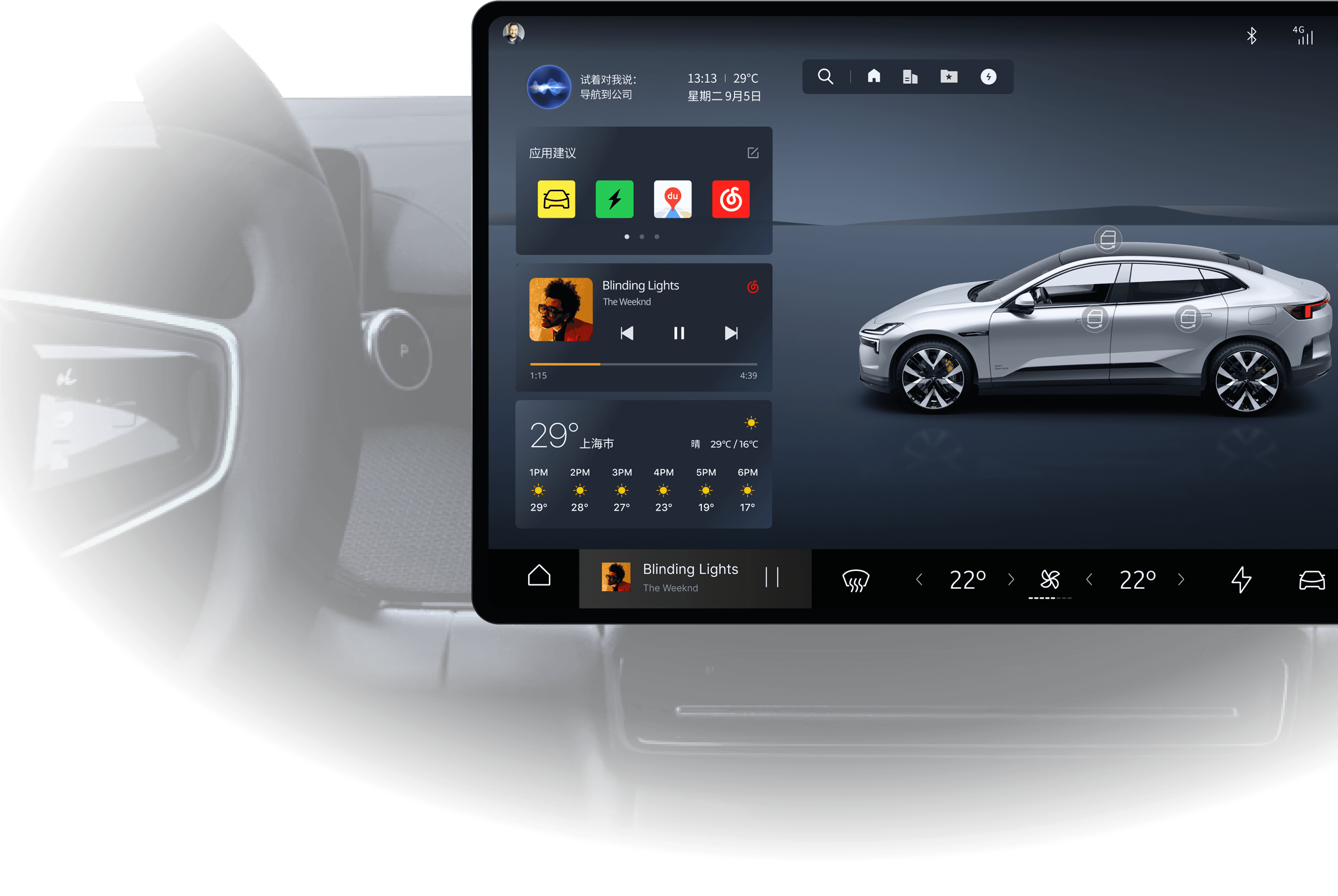
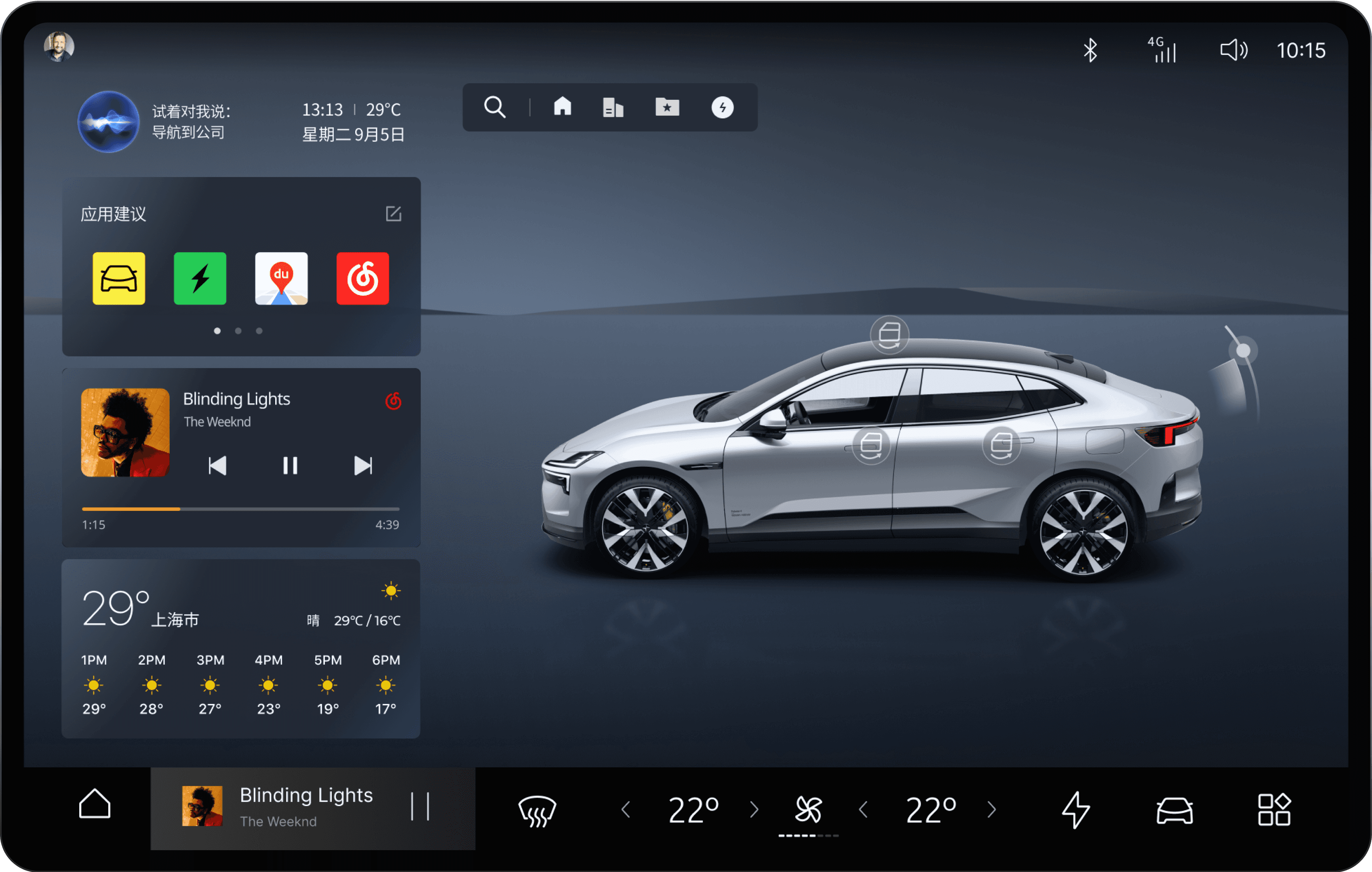
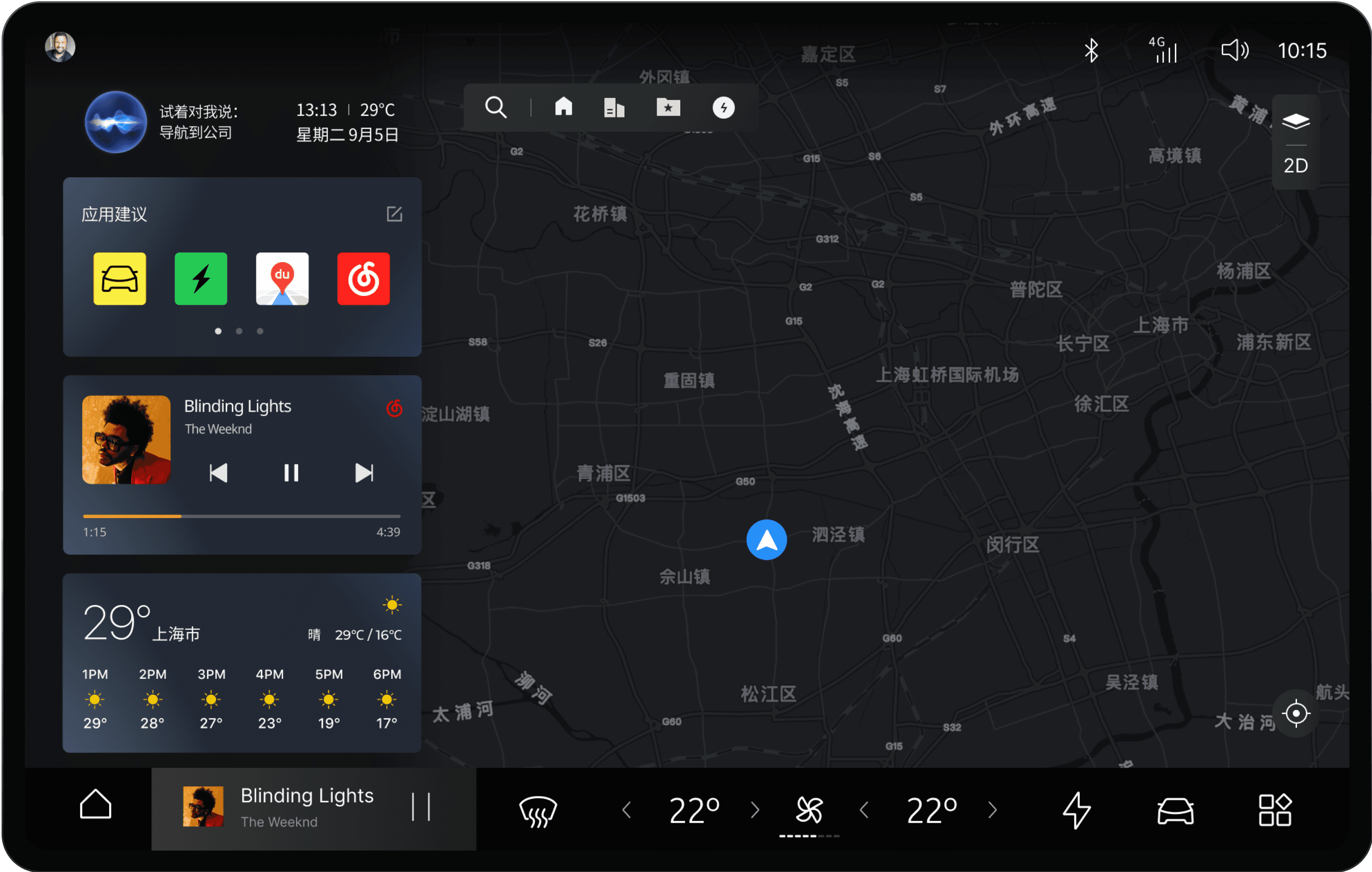
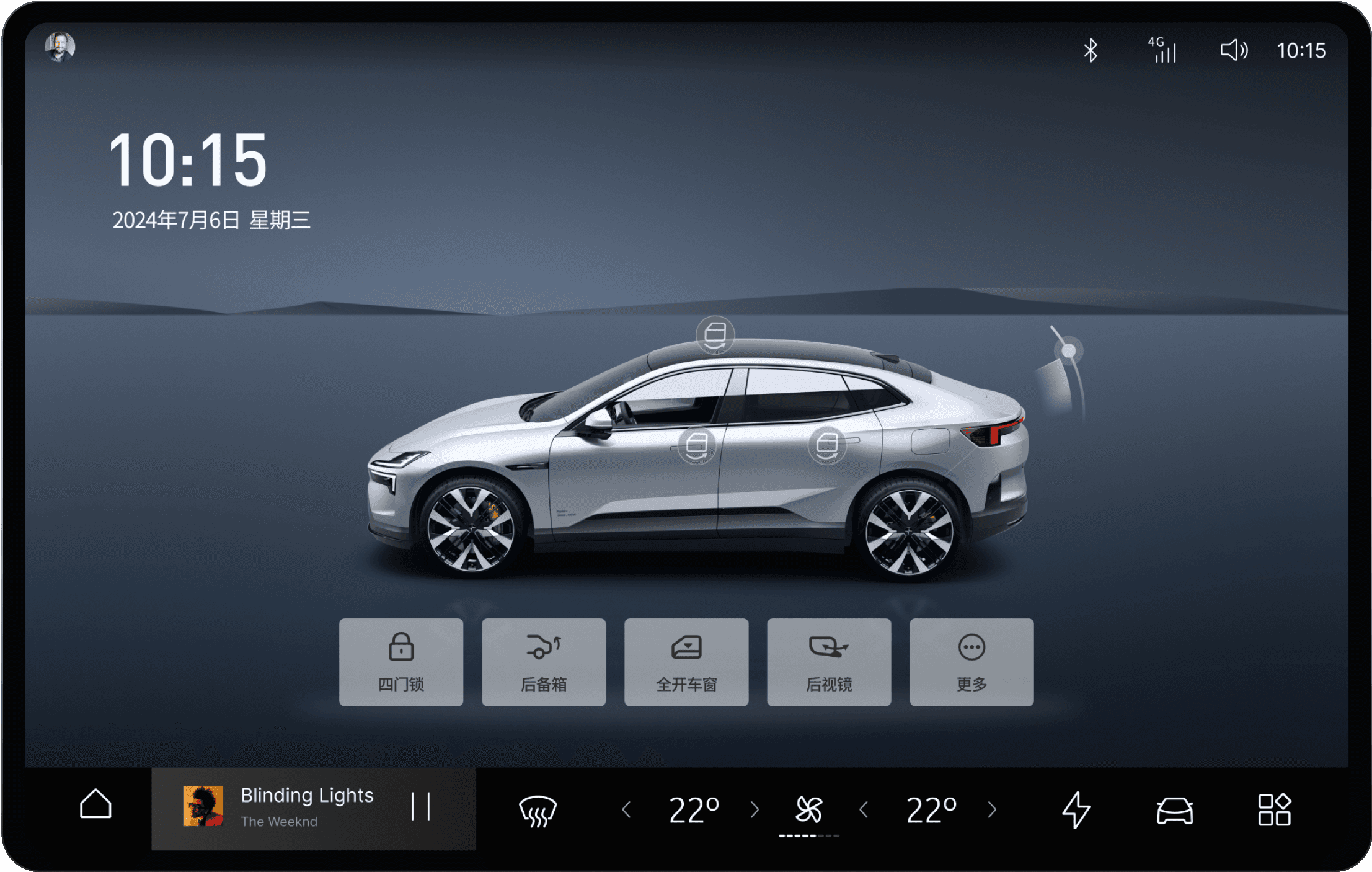
The centre console display is the nerve centre of the entire HMI, serving as the primary gateway for users to quickly access all functions. The interface intelligently adapts by automatically switching between 'Driving' and 'Stationary' modes based on the vehicle's state.

The design philosophy is centred on simplifying complex workflows to enhance the user experience. This enables the driver to effortlessly obtain information and execute commands while on the move, ensuring every interaction is intuitive, efficient, and user-focused.

Parked State: Model Mapping & Expansion

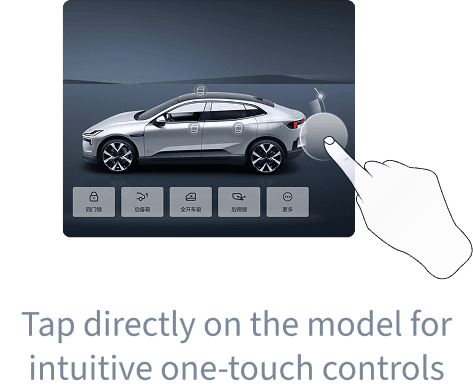
Intuitive Mapping: When parked, the main canvas transitions to a comprehensive 3D vehicle model and status display, allowing control actions to directly correspond to visible objects.

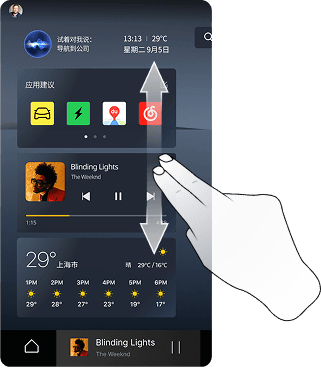
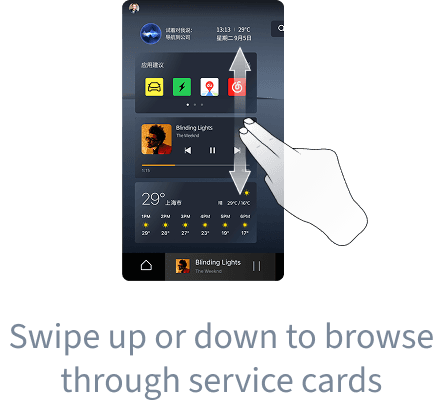
Chunked Browsing: Service cards unfold on the left, enabling faster scanning and management of vehicle status and frequent services (Achieving Glanceability).

Driving State: Task Focus & Convergence

Task-Driven Contraction: Upon entering the driving state, the interface actively suppresses secondary information, dedicating the visual focus to navigation and essential feedback.

Low-Interference Strategy: The dark interface and restrained visual hierarchy collectively ensure readability and driving focus under complex lighting conditions.

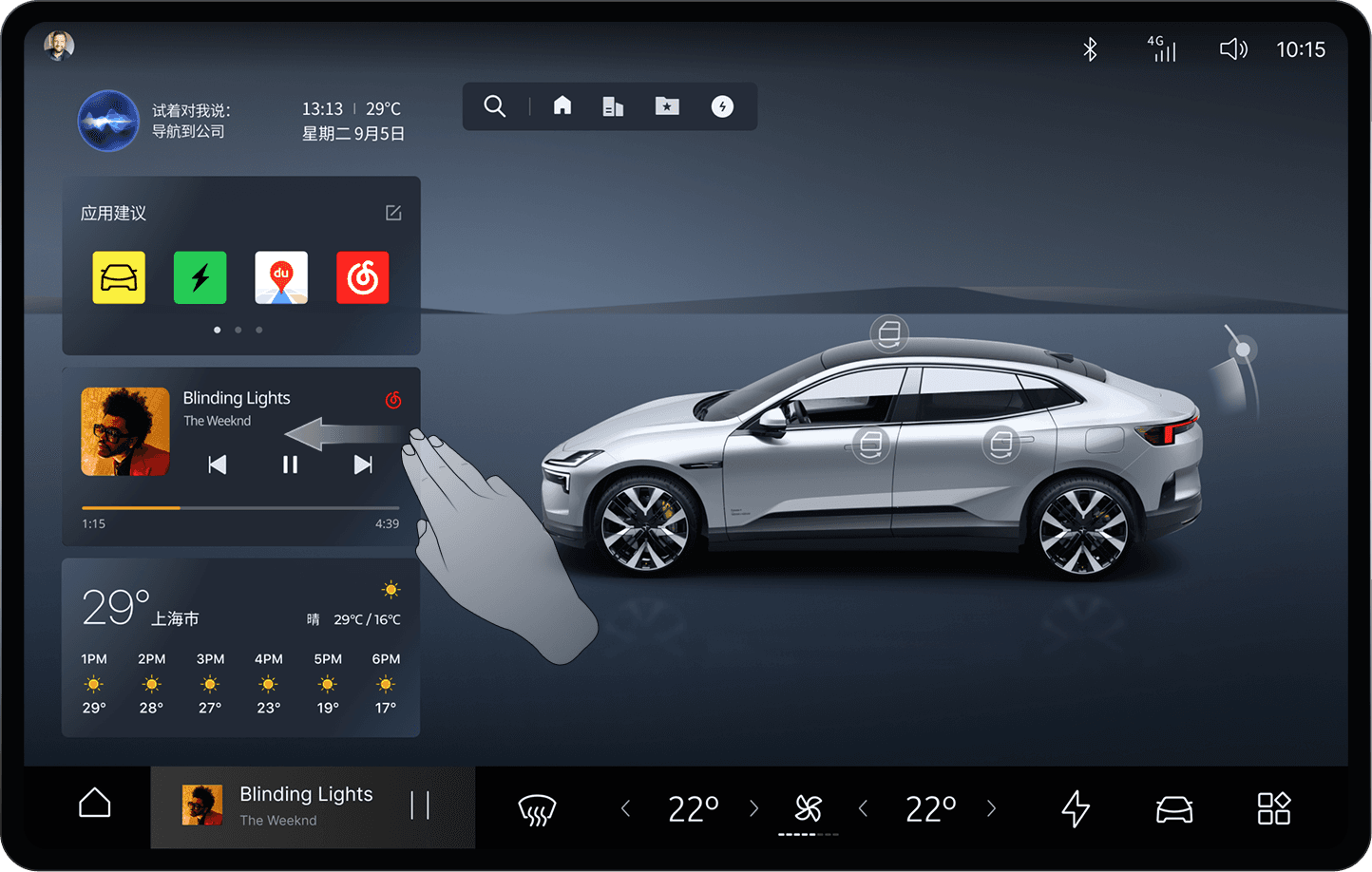
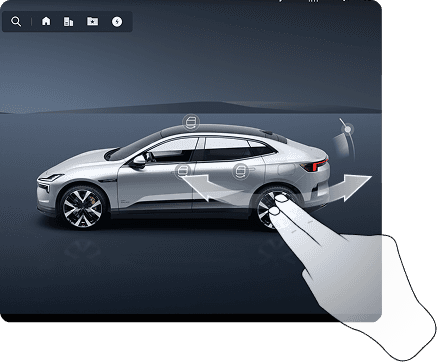
Core Gesture Interaction: Reducing Visual Reliance

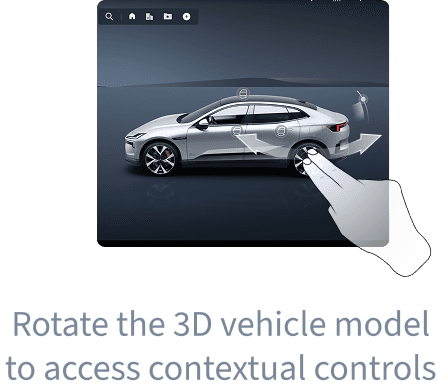
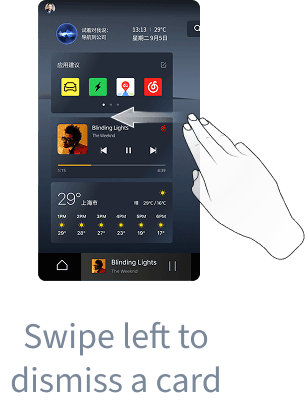
In fast-paced driving environments, the system reduces visual reliance through a tolerance-first action design. By replacing high-precision tapping with broader swiping and direct manipulation (leveraging gross motor skills), interaction safety is significantly enhanced. Additionally, low-friction view switching is achieved via edge-swiping and 3D model manipulation, making cross-scenario focus transitions remarkably smooth.

Swipe up or down to browse through service cards

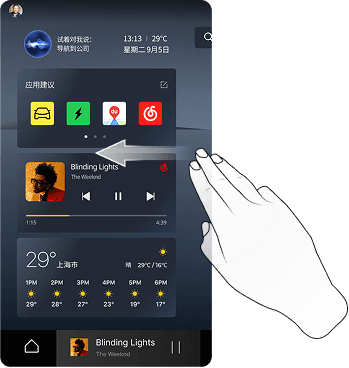
Swipe left to dismiss a card

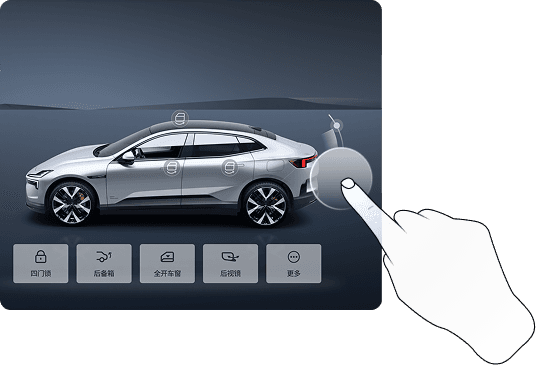
Tap directly on the model for intuitive one-touch controls

Rotate the 3D vehicle model to access contextual controls

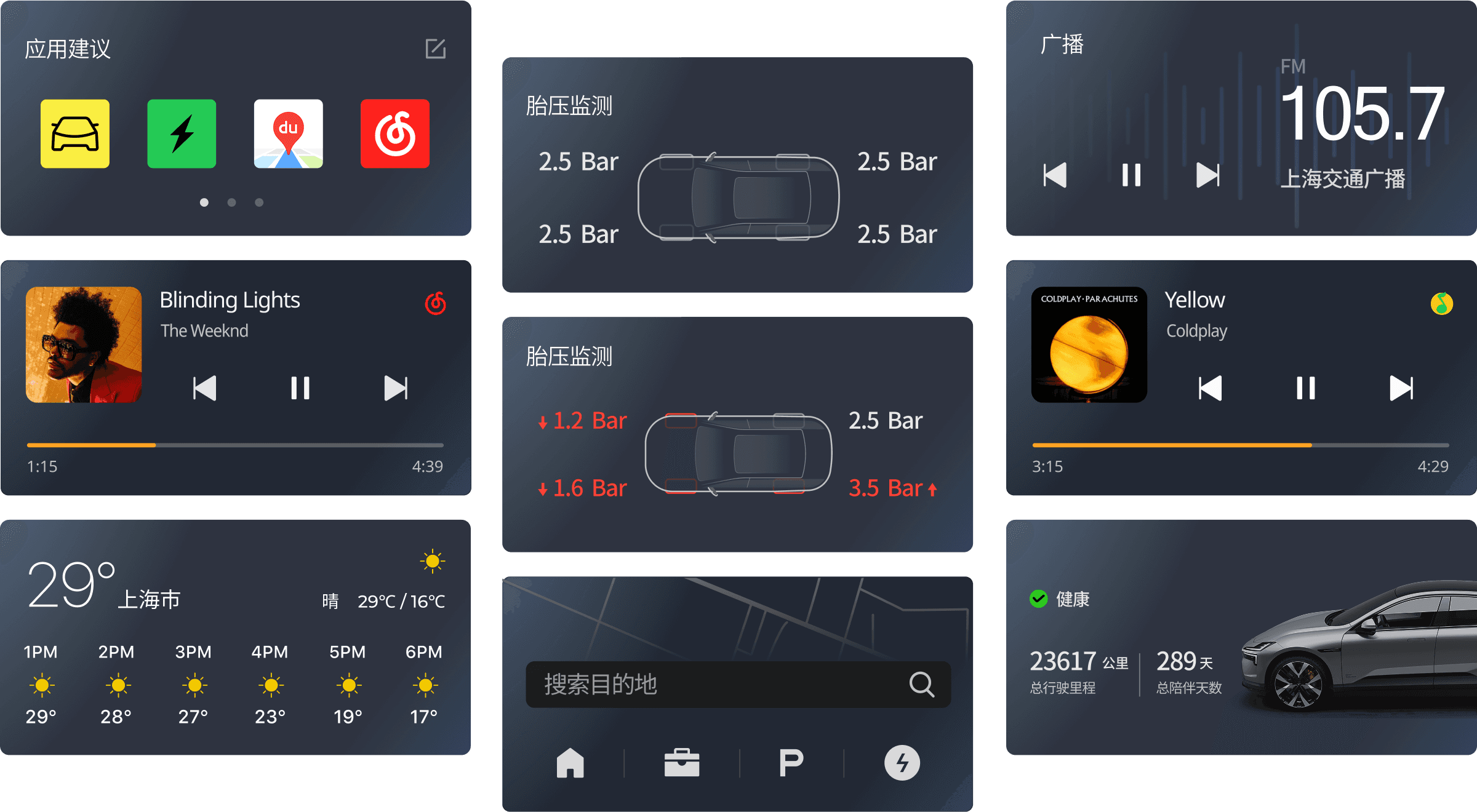
Service Widget System: Modular Information Gateway

The widget system establishes a highly modular information gateway. High-frequency data and core states are chunked and kept at a surface level, drastically reducing the need for deep navigation. During abnormal vehicle states, the system introduces immediate visual interventions using distinct color contrast (triggering pre-attentive processing) for rapid identification. Furthermore, these adaptable containers preserve flexible space for intuitive sorting and personalized arrangement.

QUICK ACCESS SCREEN

Building clearer interpretation and

confirmation paths for low-frequency,

high-risk tasks

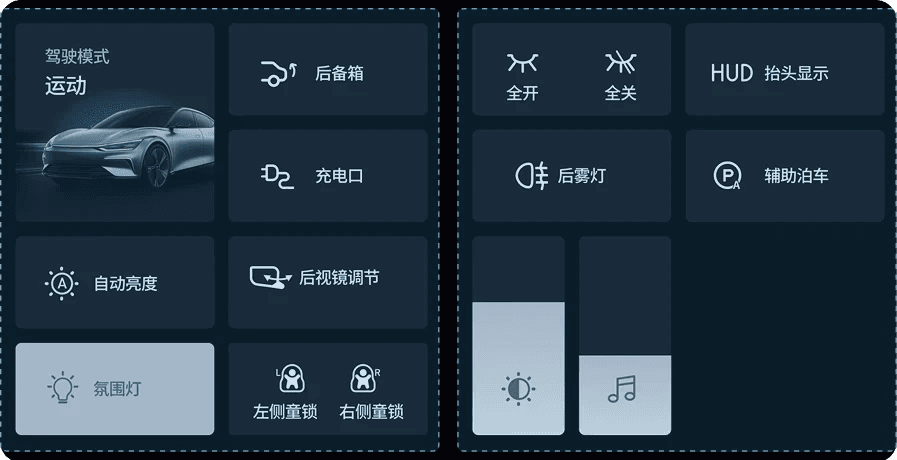
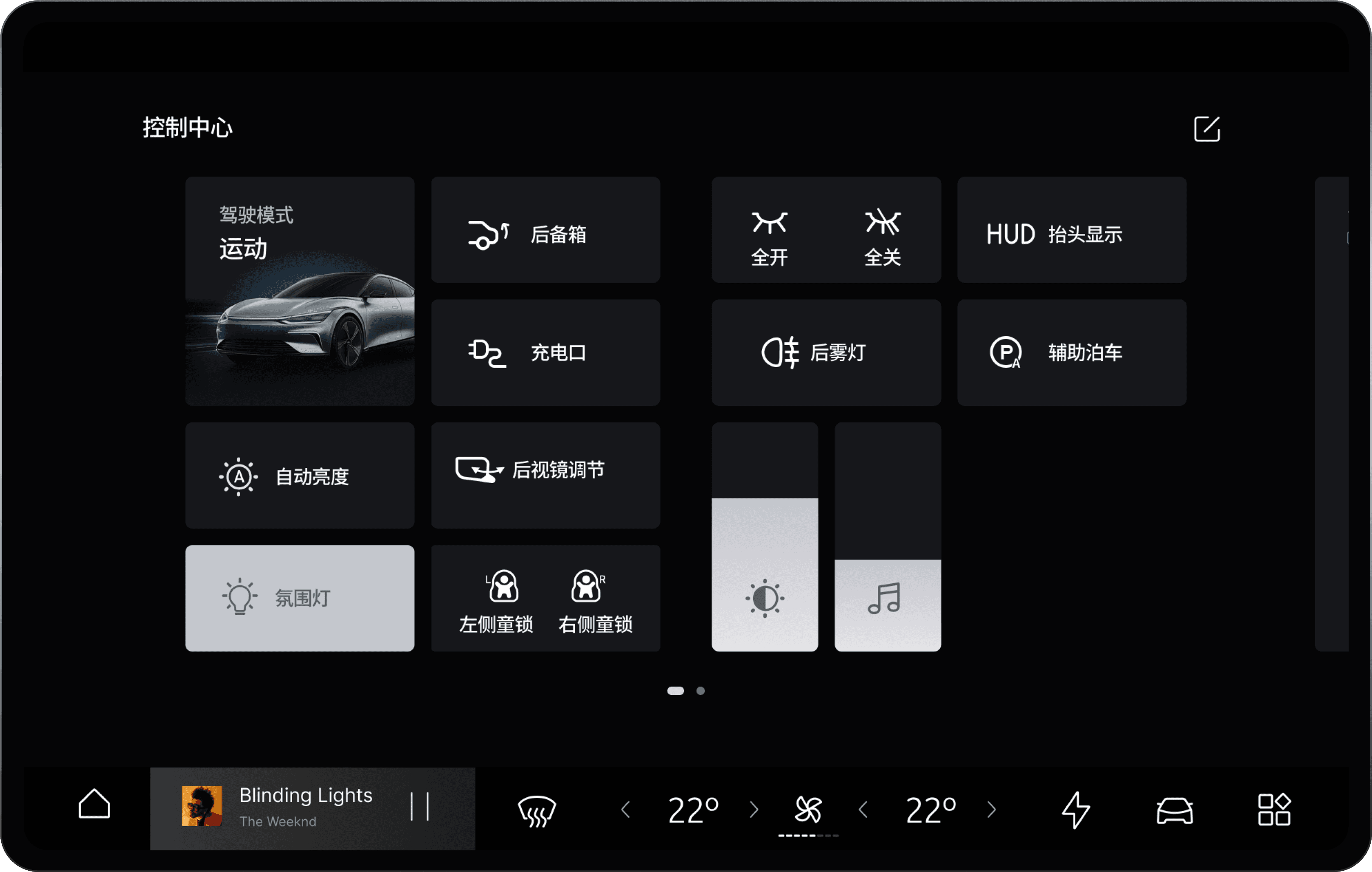
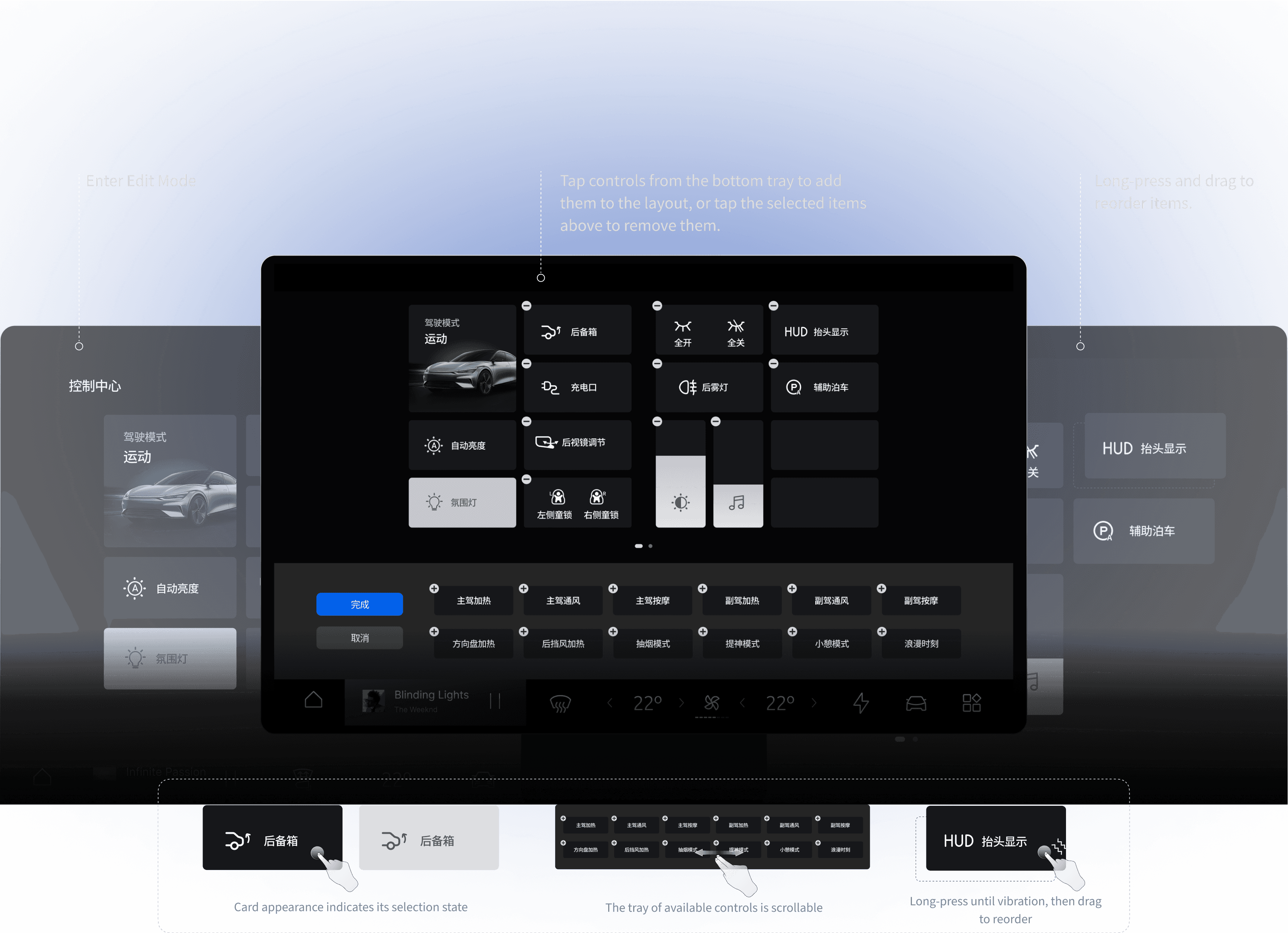
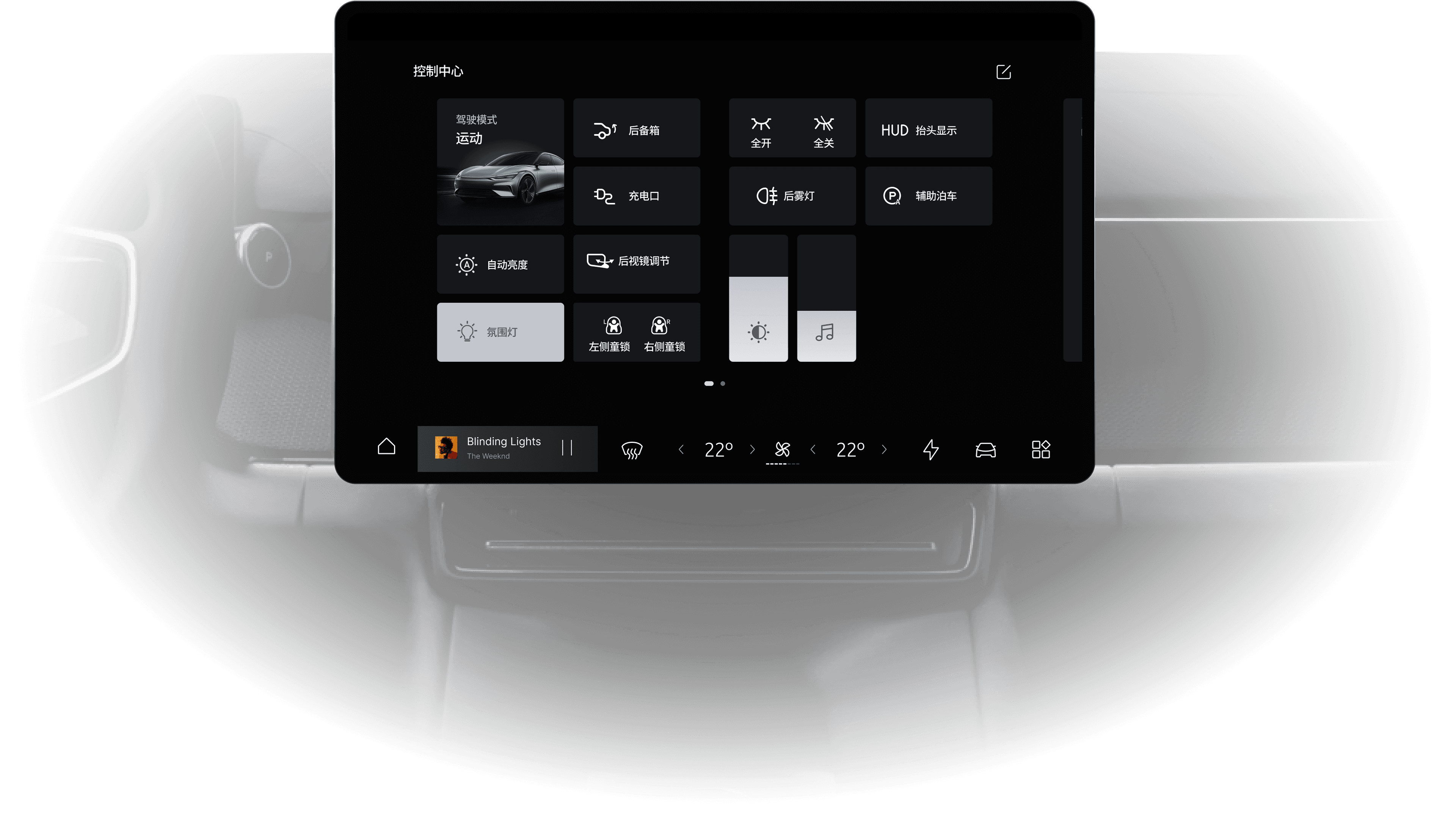
Frequent in-drive vehicle controls require a global entry point that can be called up without breaking the current task. Through a zero-layer pull-down panel, clear grouping logic, and a reconfigurable control layout, Quick Access concentrates core actions into an easier-to-reach zone while balancing reach efficiency with cognitive load.

Icon-First Global Access:

Quick Access organises frequent controls through icon-first recognition, reducing reading demand and interpretation cost while driving. By bringing common actions into a single global layer, adjustments can be accessed and completed within a shorter path.

Cognitive Chunking & Priority Layout:

To reduce cognitive load, controls are organised into compact groups based on function and frequency of use. More critical targets are given clearer size and placement priority, shortening search paths and making repeated interactions easier to internalise over time.

Personalised Control Layout

Driving routines and personal habits vary, which makes fixed control layouts inherently limited. By introducing a reconfigurable grid and component pool, the system allows users to place frequent controls in more accessible positions while maintaining a consistent visual structure. Over time, this helps the control layer align more closely with individual habits and supports faster muscle memory.

ADAS Settings

Building clearer interpretation and

confirmation paths for low-frequency, high-risk tasks

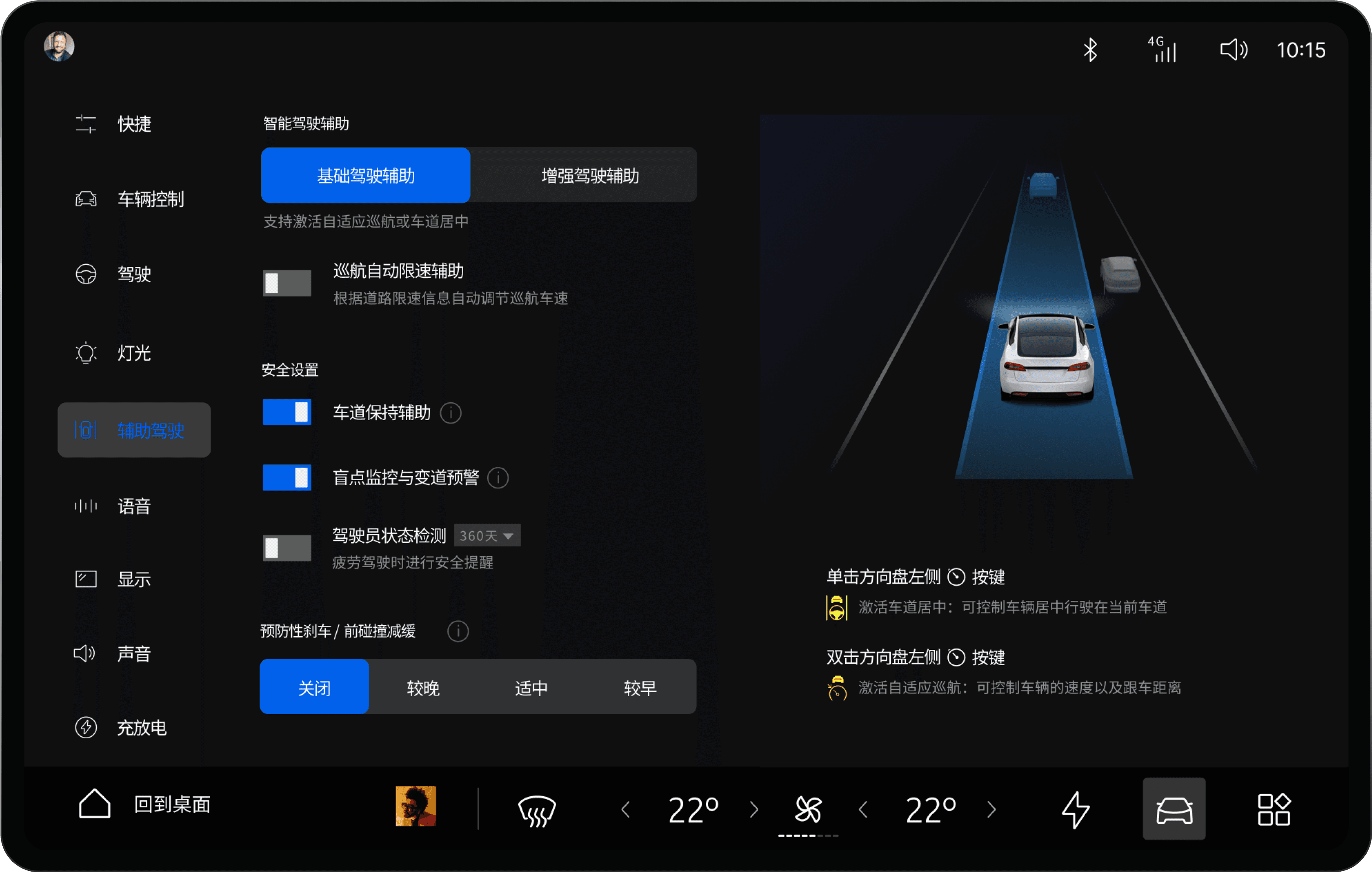
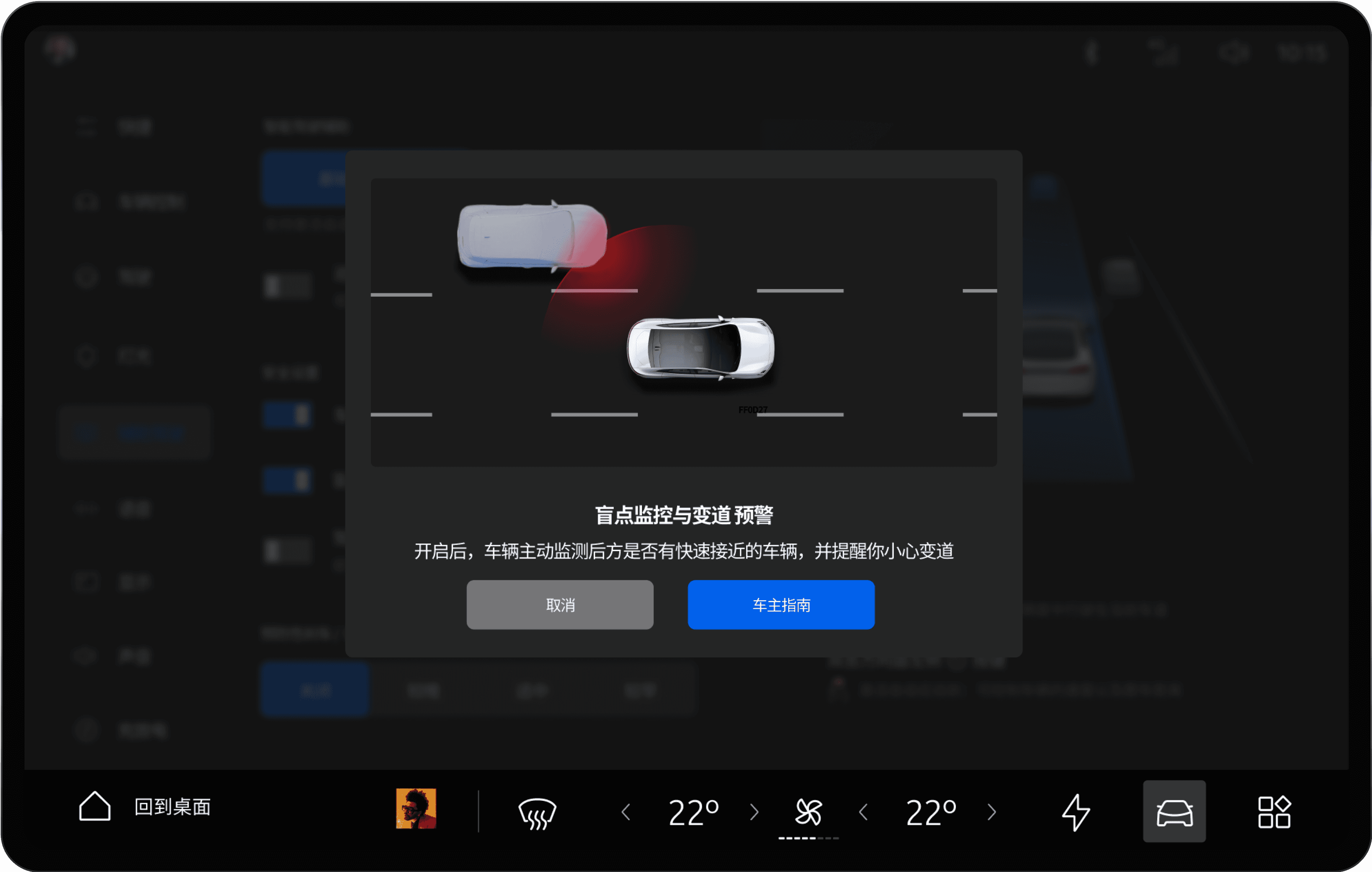
As defined earlier in the interaction strategy, ADAS configuration is a typical low-frequency, high-risk task. In this context, the interface needs to support interpretation before action. Through clearer configuration hierarchy, visible state cues, and contextual explanation, the system helps users build more accurate expectations before enabling a function.

Progressive disclosure:

Base assistance, advanced assistance, and safety settings are separated into clearer levels, so users only process the amount of information needed at each step.

Visible system state:

Toggles, modes, and intensity presets stay within the same field of view, making current state and expected behaviour easier to verify together.

Context-linked illustration:

The visual lane model and steering-wheel hints connect software settings to on-road behaviour and physical controls.

Scenario-based explanation:

Functions are explained through driving situations rather than abstract labels alone.

Reduced ambiguity:

Trigger conditions, warning behaviour, and functional boundaries are made easier to grasp through visual explanation.

Deliberate confirmation step:

The confirmation action is supported by clearer expectations, rather than reduced to a purely formal click.

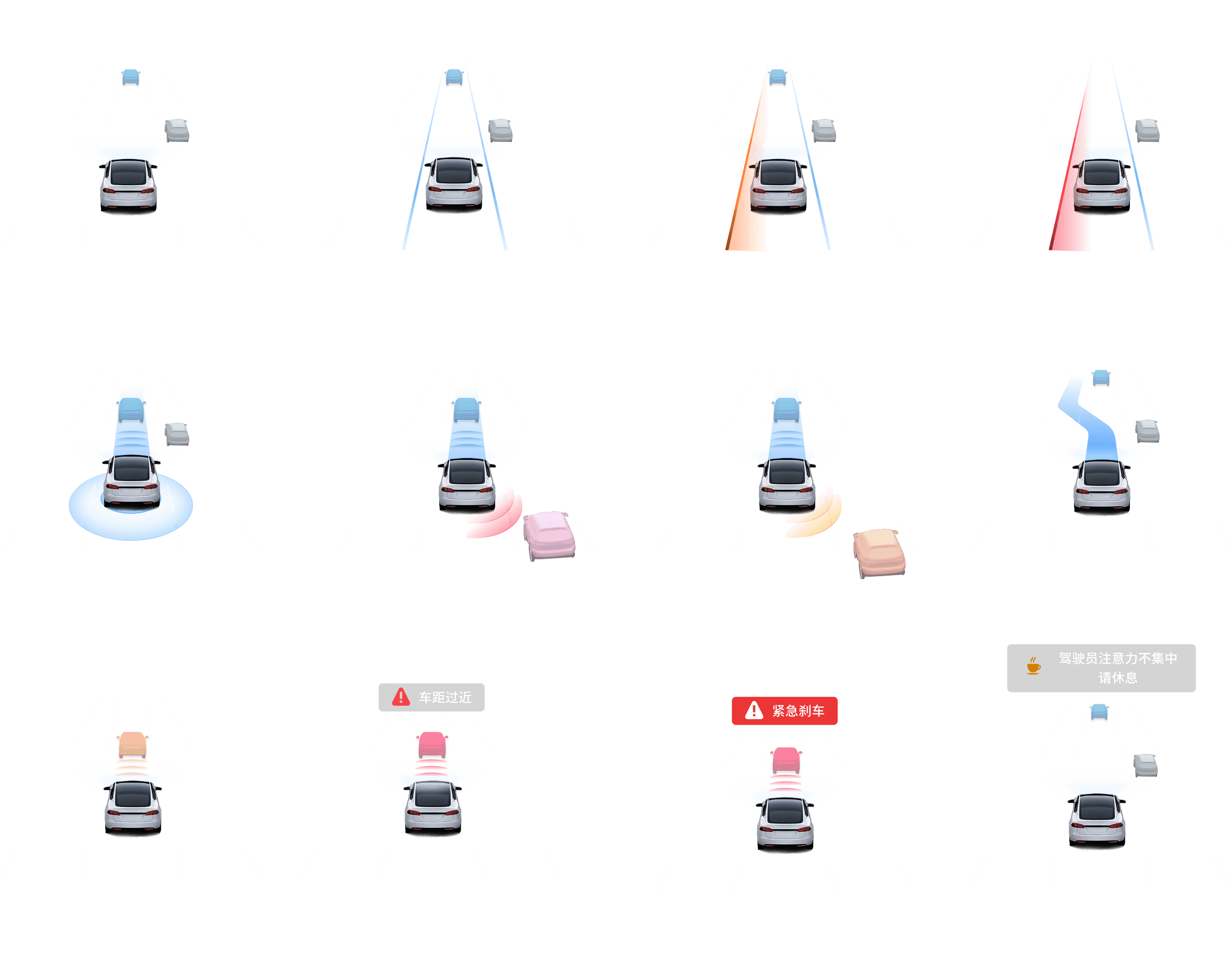
ADAS Status & Alert Visualisations /

Making live system states easier to recognise and differentiate

Moving from configuration to active driving, the system requires a visual language that turns live assistance states into immediate driver awareness. Rather than relying on isolated alerts, the interface uses consistent colour semantics, lane-based visuals, and a clear state hierarchy to organise operational states, cautions, and warnings into a feedback system that is easier to scan at a glance.

Unified status language

Different functions share a consistent visual grammar and colour hierarchy, reducing reliance on label-by-label reading

Severity through visual hierarchy

Normal operation, caution, and warning states are separated through colour and visual intensity, helping users judge the current condition more quickly.

Glanceable feedback system

Lane visuals, surrounding vehicles, and alert cues are integrated into the same field of view, making feedback easier to scan during driving.

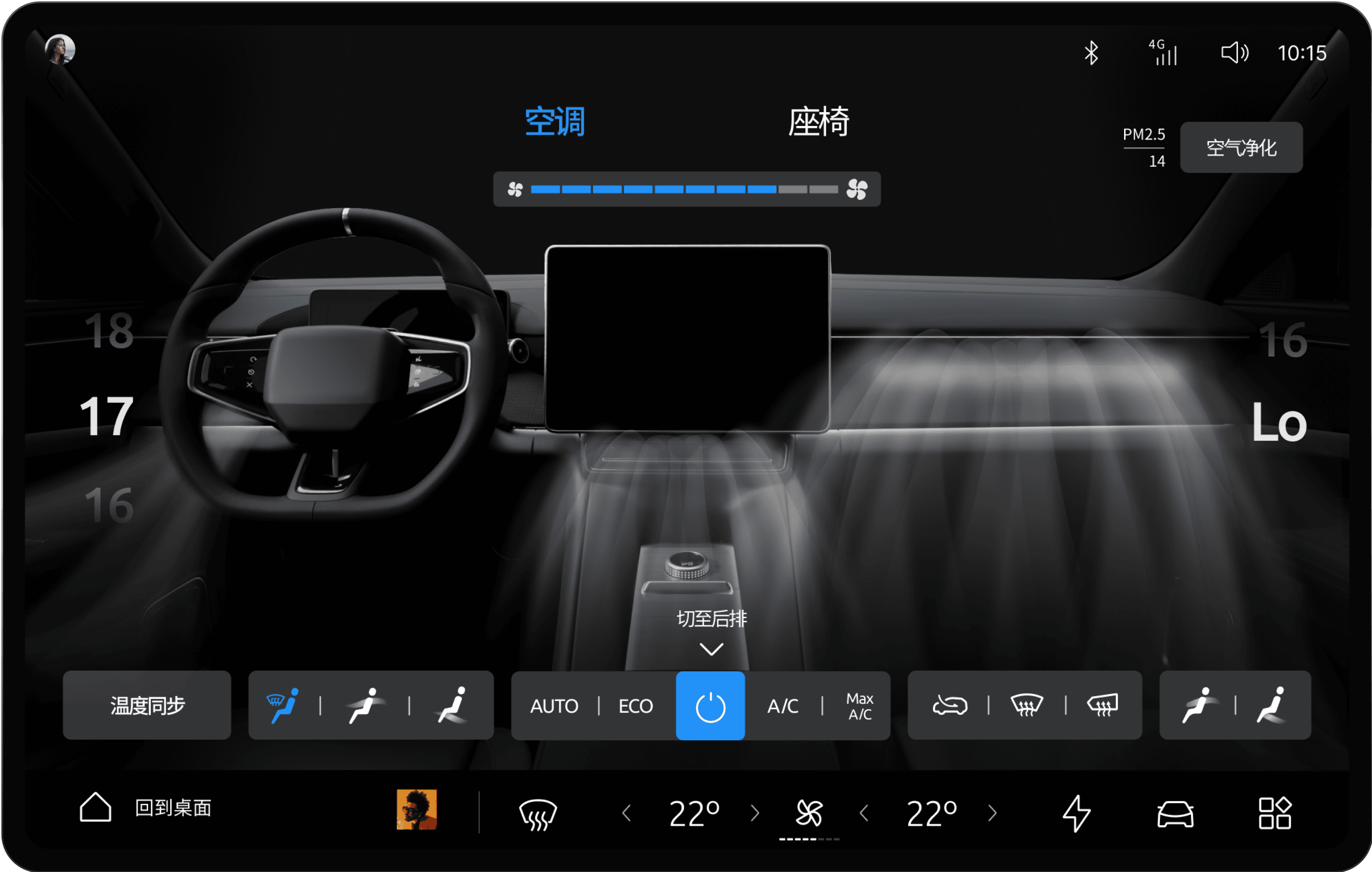
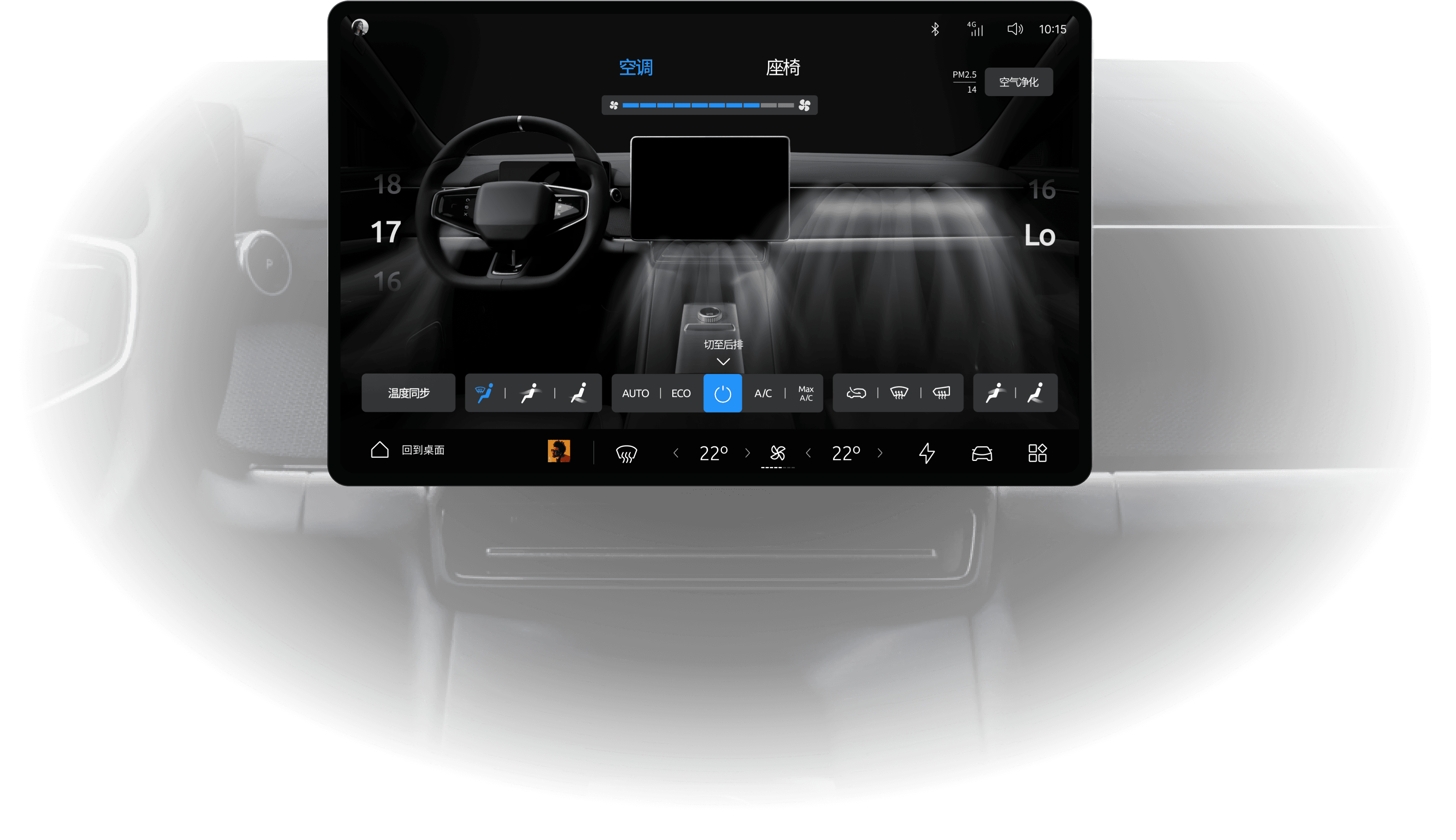
Climate & Comfort

Building clearer interpretation and

confirmation paths for low-frequency, high-risk tasks

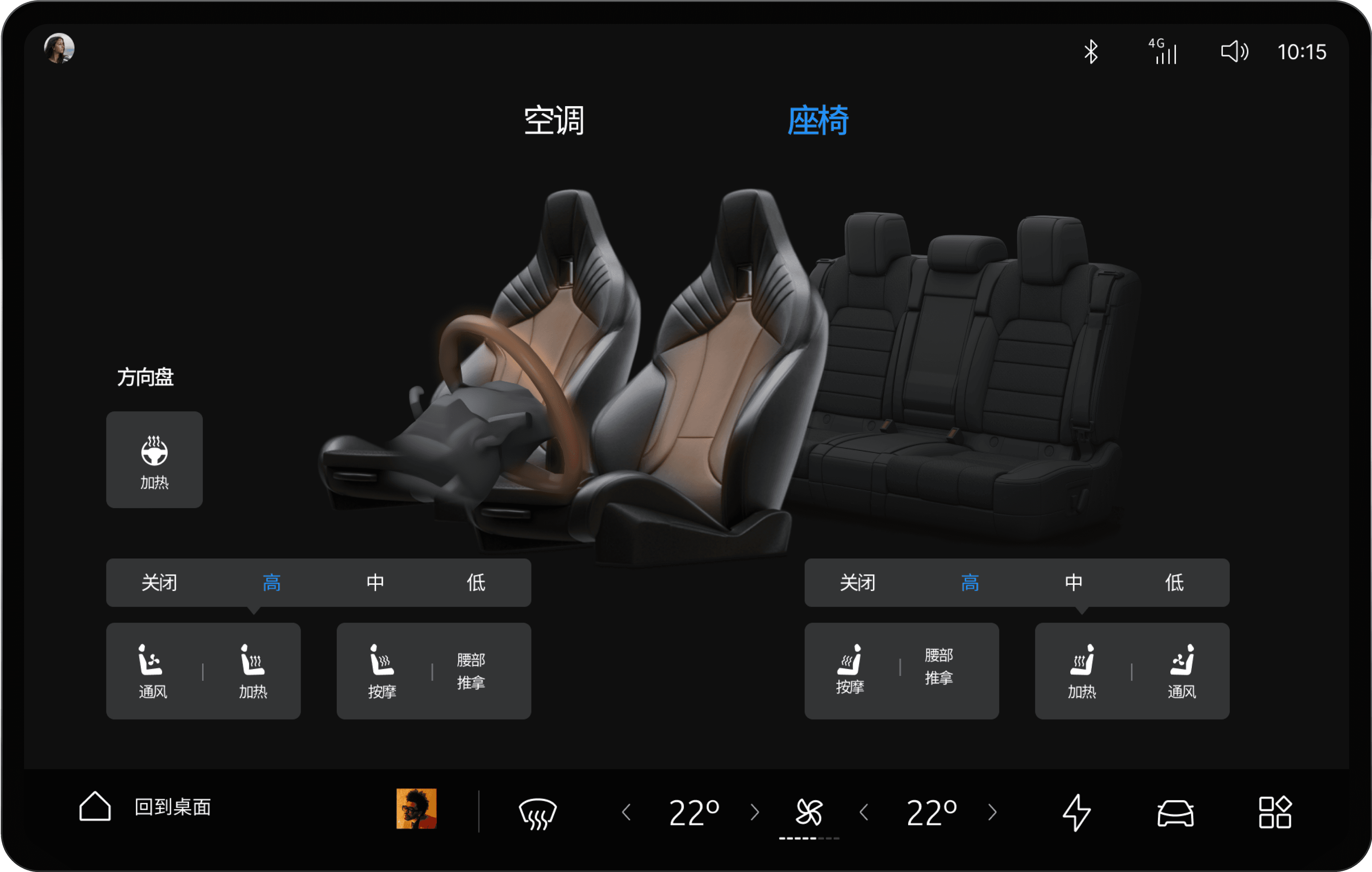
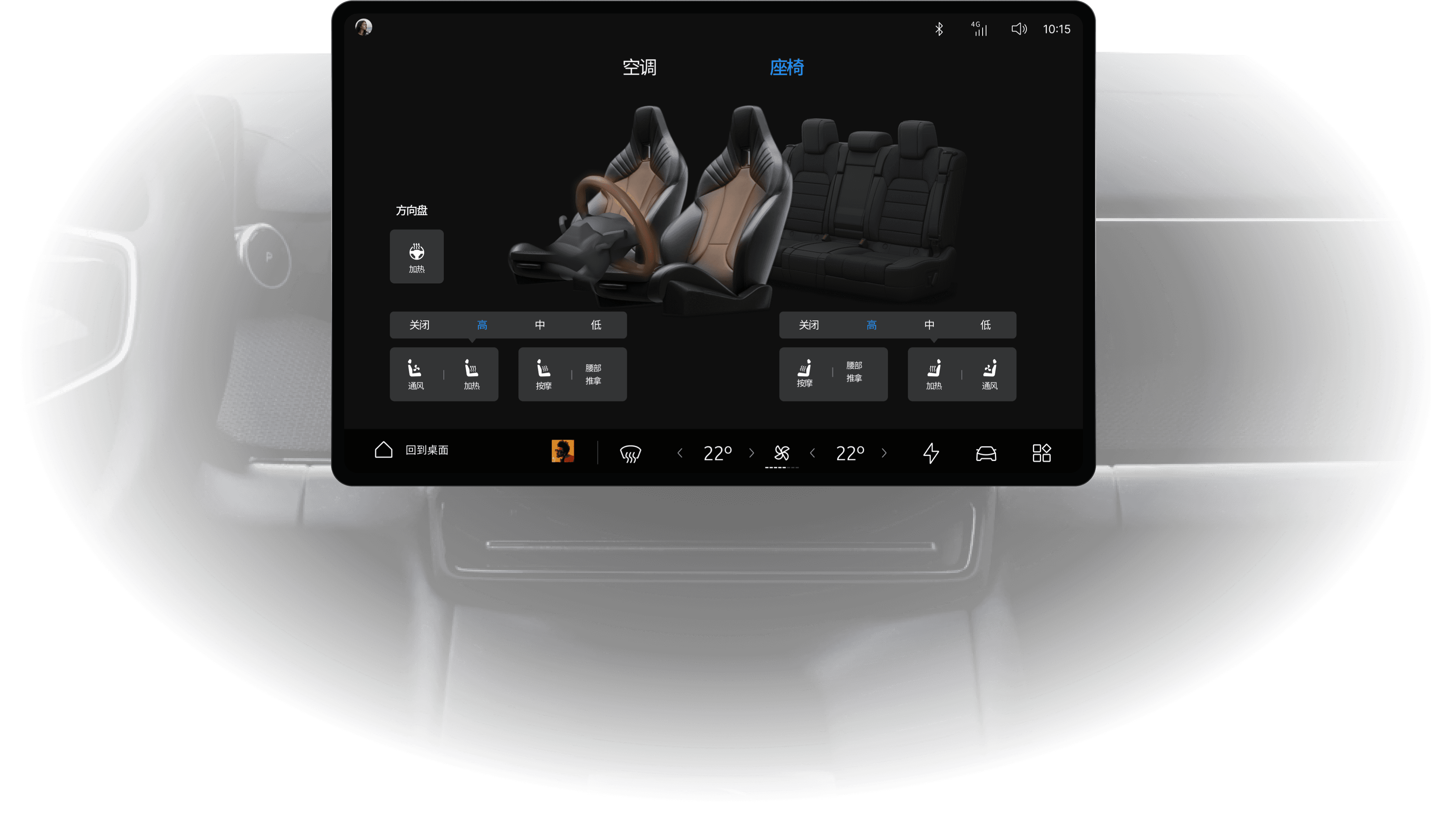
Climate and seat adjustments are among the most frequent comfort-related tasks in the cabin. To reduce the effort of reading parameters and locating controls, the interface connects digital controls more directly to cabin space and zones of effect, making adjustments easier to understand, verify, and repeat in everyday use.

Direct spatial mapping:

Airflow direction and area of effect are mapped directly onto the cabin, reducing the need to interpret abstract HVAC icons.

Independent zonal control:

Driver, passenger, and cabin zones remain clearly separated, making adjustments easier to locate, compare, and confirm.

Controls and result in one view:

Temperature, mode, airflow, and environmental change stay within the same field of view, reducing back-and-forth between setting and outcome.

Zone-based mapping:

Heating, ventilation, massage, and steering-wheel functions are organised around their zones of effect, making the target of each adjustment easier to understand.

Separated function and intensity:

Function choice and intensity levels are split into clearer layers, making current settings easier to read.

Integrated comfort layer:

Seat and steering-wheel adjustments stay within one comfort layer, so related controls are not fragmented across different paths.

Charging & Energy

Keeping status reading, charging progress,

and strategy decisions in one flow

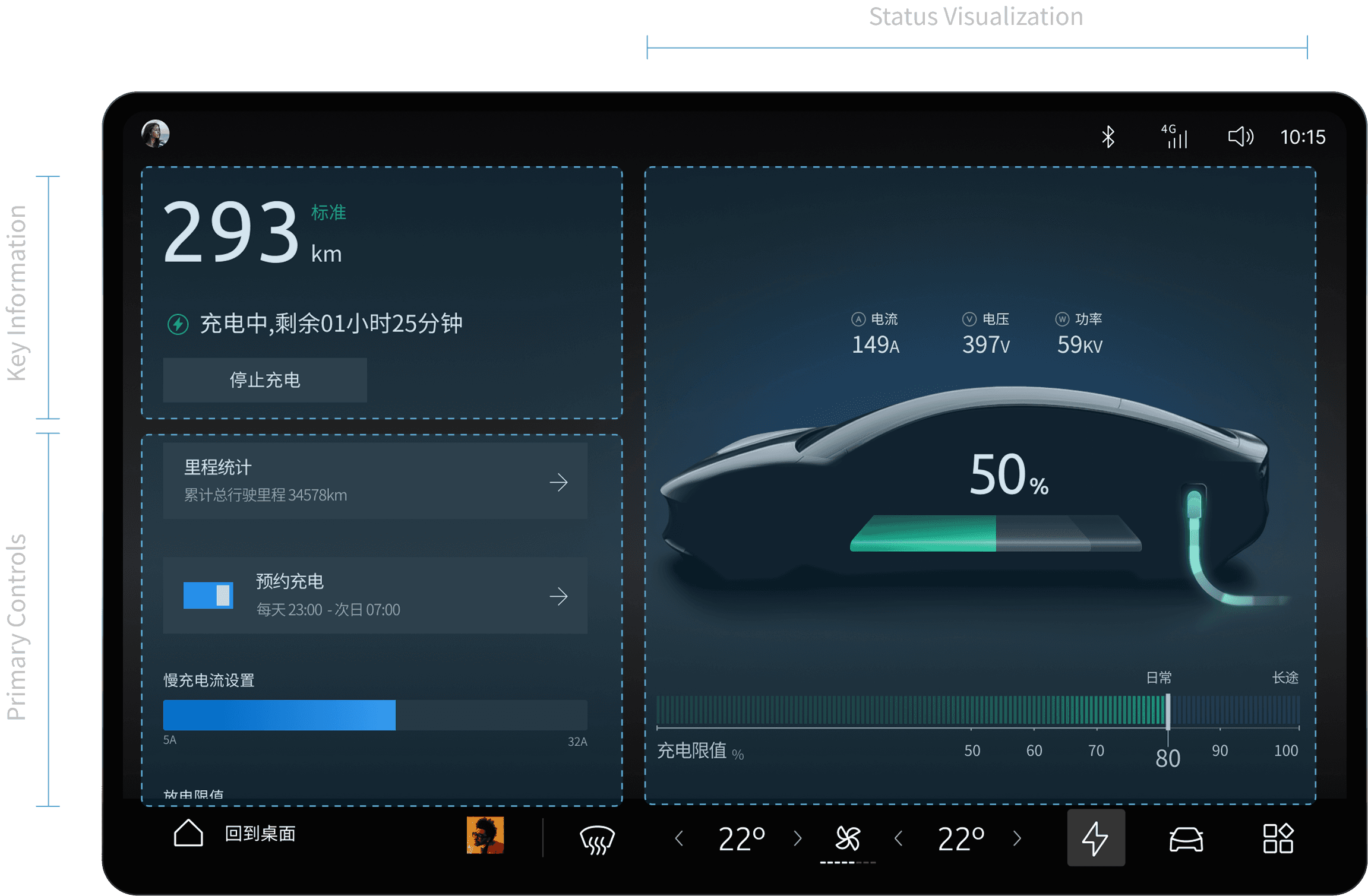
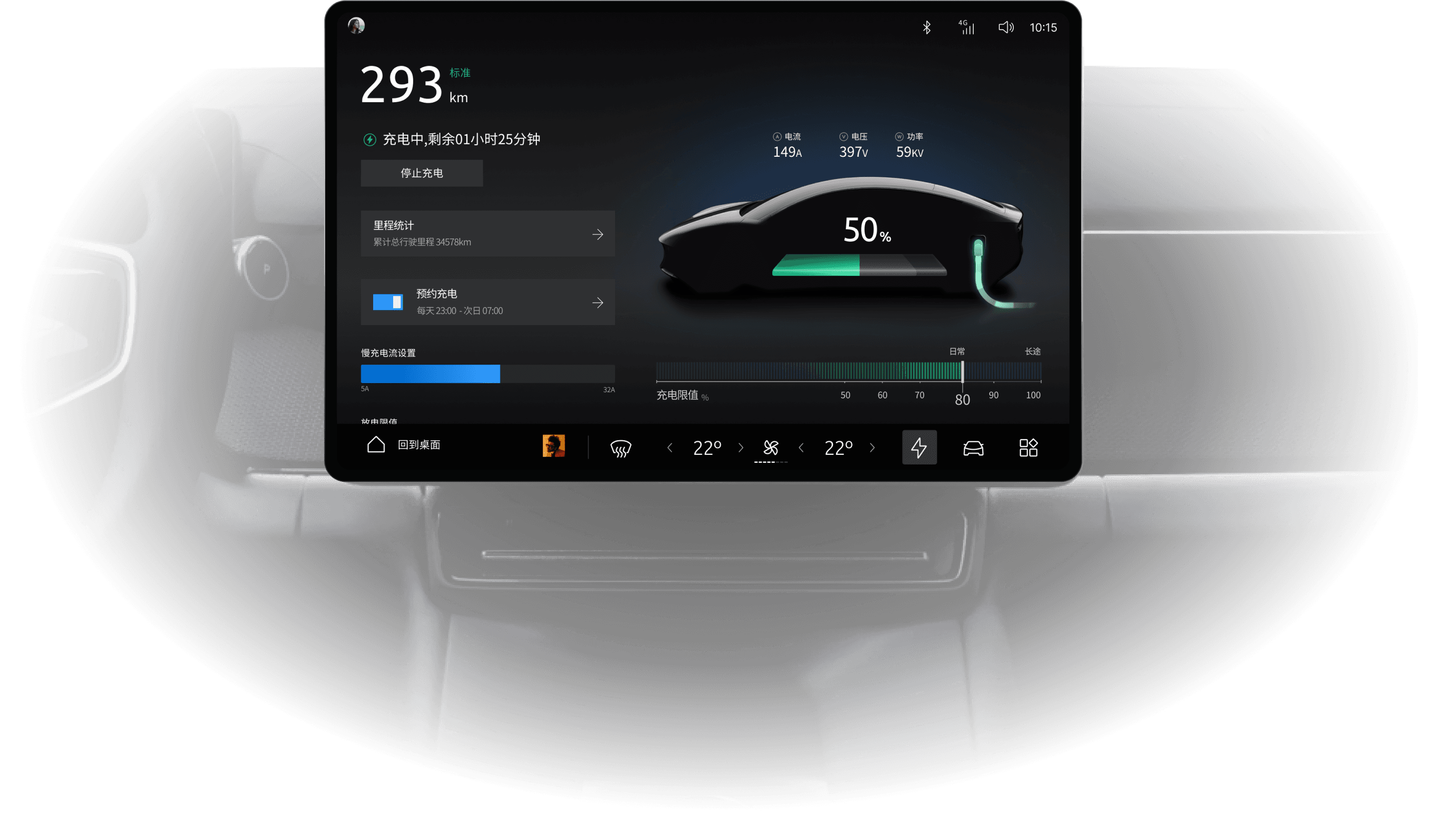
Charging management requires both fast status reading and ongoing charging decisions. Through clear hierarchy, visual feedback, and scenario-based settings, the interface keeps status, charging progress, and strategy within the same view.

Priority-driven layout:

Range, charging status, and remaining time are placed where they can be read first, with primary actions following naturally.

Tangible charging feedback:

The vehicle silhouette, battery level, and charging metrics communicate change beyond numbers alone.

Scenario-based strategy setting:

Charge cap and slower-charging settings are framed through daily and long-trip contexts, making them easier to judge.

Music Experience

Maintaining low visual load

between content discovery and active playback

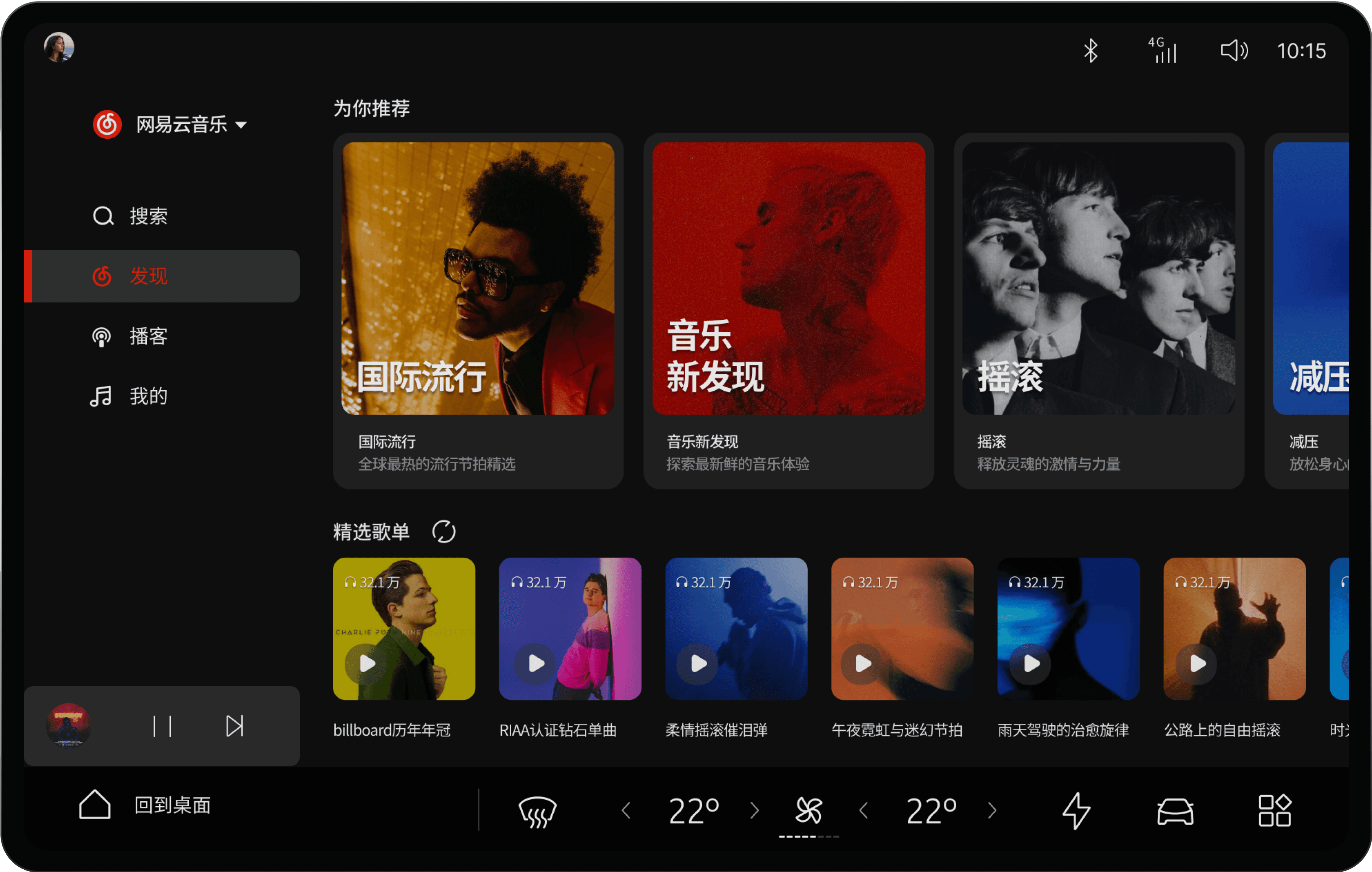
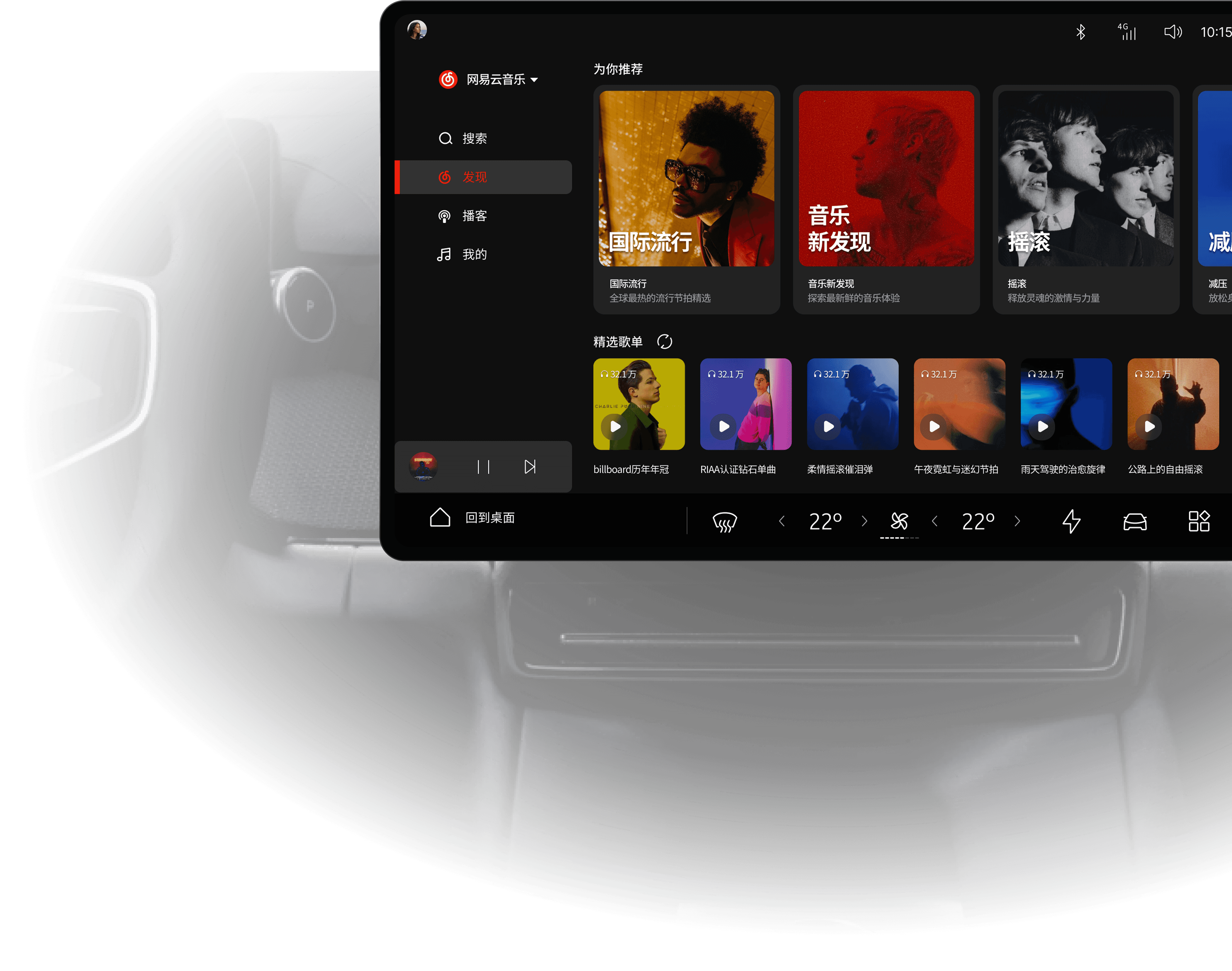
In-car music use includes both content discovery and the ongoing sense of companionship during playback. To balance complex browsing with low visual load while driving, the interface separates library browsing and active playback into two clearer states: one optimised for fast discovery and entry, the other for focused listening and lightweight control.

Recommendation-led visual discovery:

Large recommendation cards occupy the main visual area and rely on cover-led recognition, allowing discovery to depend more on scanning than on active search.

Large targets and shallow playback entry:

Content cards expand the effective touch area and allow playback to begin without entering a deeper detail page, shortening the path from browsing to listening.

Persistent playback anchor:

The mini player remains fixed at the bottom, keeping the current listening state and playback controls available during browsing.

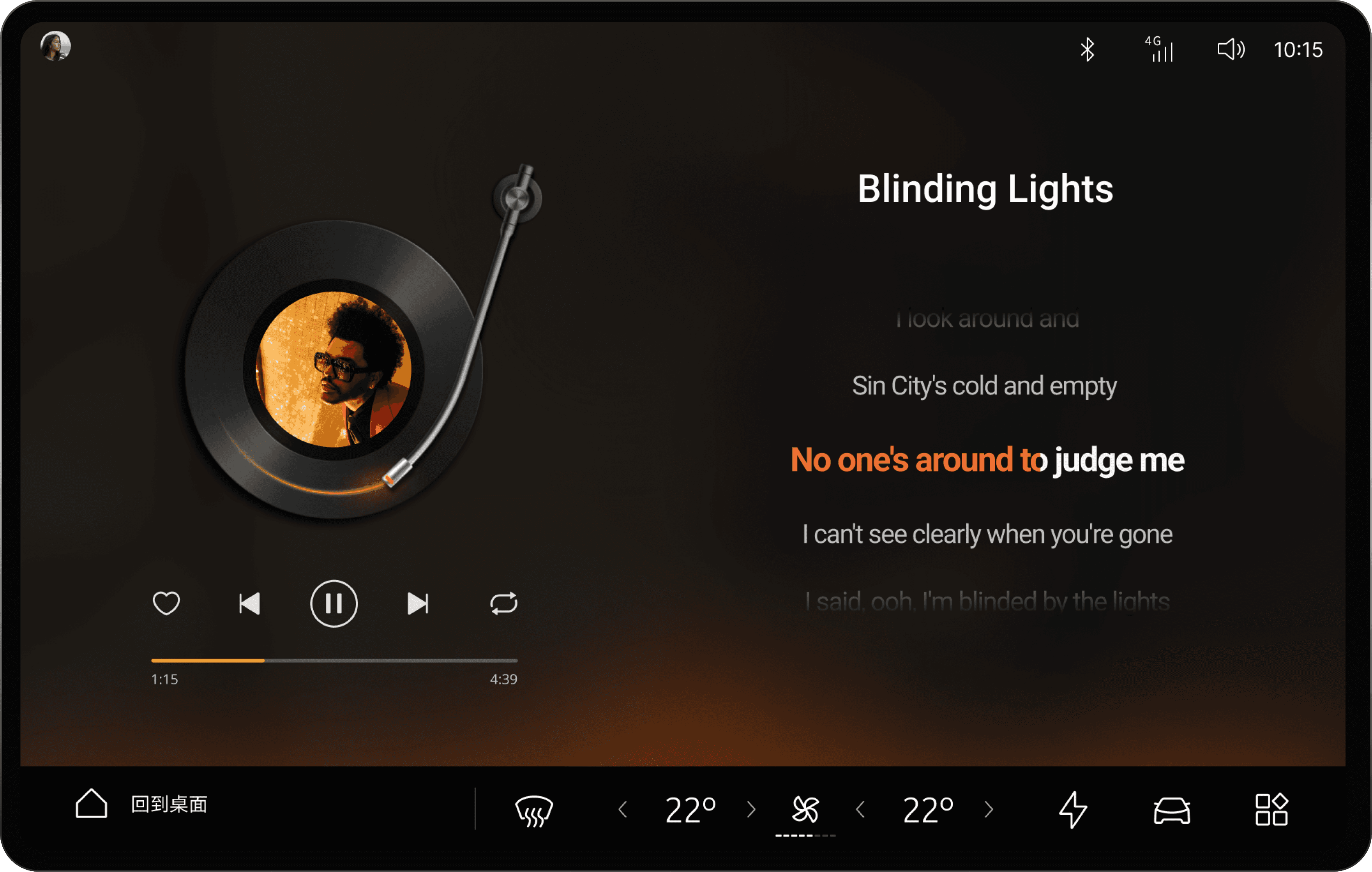
Current content comes into focus:

Album art, track information, and lyrics move to the foreground, shifting the interface from finding content to following what is currently playing.

Controls stay close to the playback state:

Play, skip, favourite, and progress controls are arranged around the main visual, keeping frequent actions accessible without pulling attention away from the content.

Atmosphere changes with the content:

Background tone and record-inspired visuals reinforce the current song, giving the playback screen a more cohesive emotional character beyond pure utility.

Results & Reflection

Reviewing the final system

through measurable signals

Evaluation was conducted through a lightweight mixed-method framework combining heuristic review, cognitive walkthrough, task-based prototype testing, and SUS. Together, these methods were used to revisit the HMI as a whole through interaction efficiency, visual demand, structural clarity, and perceived usability.

Evaluation Framework /

Turning earlier challenges into testable measures

The driving interaction challenges identified earlier were translated into measurable usability criteria at this stage, making it possible to review whether the final interface produced clearer outcomes in efficiency, visual demand, perceived usability, and structural consistency.

Problem

What It Means

Key Metrics

Functionality vs. Simplicity

Are frequent tasks still buried in unnecessarily deep menu structures?

Interaction steps / KLM-estimated task time

Safety vs. Attention

Do key states and controls add unnecessary visual demand while driving?

1.5s recognition / visual target count

Expectation vs. Reality

Is system behaviour clear, predictable, and aligned with user expectations?

SUS score / key understanding gaps

Fragmentation vs. Consistency

Do different modules still behave like separate pages rather than one continuous HMI system?

consistency review / feature discoverability

Heuristic EvaluationCognitive WalkthroughTask-based Prototype TestingSUS

Key Results/

Reading the final solution through system-level indicators

Findings were consolidated into four system-level indicators covering interaction depth, short-glance recognition, perceived usability, and cross-module consistency.

Interaction Path

2

High-frequency core tasks were contained within a 2-step path, with a KLM-estimated task time of 1.8s.

Frequent actions were brought back to a shallower layer, reducing search, backtracking, and error recovery.

Related to / Functionality vs. Simplicity

Short-Glance Recognition

95%

Critical states reached 95% recognition accuracy under a 1.5-second exposure check.

Safety-related information no longer depends on full reading, and supports shorter visual dwell.

Related to / Safety vs. Attention

Overall Usability

82.5

The system reached a SUS score of 82.5 / 100, while 4 key understanding gaps were resolved.

Spatial mapping, contextual explanation, and configurable access brought system behaviour closer to user expectations.

Related to / Expectation vs. Reality

System Consistency

12 / 12

All 12 core criteria in the cross-module consistency review were met.

Modules can now be read as one continuous, predictable HMI language rather than isolated feature pages.

Related to / Fragmentation vs. Consistency

Design Implications /

Judgements further clarified through evaluation

The evaluation does not replace in-vehicle testing, but it sharpened several design judgements: frequent tasks depend on shallower entry points, low-frequency safety-critical functions depend more on explanation quality, and cross-module consistency directly shapes long-term use.

01

For high-frequency driving tasks, shallower interaction depth remains the most effective optimisation strategy

For short-duration tasks such as temperature adjustment, playback control, and quick toggles, reducing path depth still matters more than adding functions.

02

For low-frequency but safety-critical functions, clarity of explanation matters more than interaction speed

Improvements in ADAS-related tasks came more from state hierarchy, explanation, and confirmation logic than from simply removing a step.

03

Cross-module consistency directly shapes long-term learning cost and behavioural adaptation

When navigation, media, vehicle control, and settings share one structural and state grammar, users are more likely to understand them as one HMI rather than separate modules.

Next step Further validation should focus on short-glance behaviour under real driving workload, error recovery cost under time pressure, and cross-screen coordination across the cluster, HUD, and steering-wheel controls. This would make it possible to evaluate attention distribution across the broader driving interface ecosystem, not only the centre display.

THANKS

EV CAR HMI DESIGN

THANKS

EV CAR HMI DESIGN

Create a free website with Framer, the website builder loved by startups, designers and agencies.